<?xml version="1.0" encoding="utf-8"?><feed xmlns="http://www.w3.org/2005/Atom" ><generator uri="https://jekyllrb.com/" version="4.4.1">Jekyll</generator><link href="https://pirateflix.sangu.be/feed.xml" rel="self" type="application/atom+xml" /><link href="https://pirateflix.sangu.be/" rel="alternate" type="text/html" /><updated>2026-07-08T11:01:47+00:00</updated><id>https://pirateflix.sangu.be/feed.xml</id><title type="html">PirateFlix</title><subtitle>Build your own automated home media server with Docker. PirateFlix wires up Jellyfin, Radarr, Sonarr, Prowlarr and more into one copy-paste HTPC setup.
</subtitle><author><name>Wouter Van Schandevijl</name></author><entry><title type="html">Watchtower: The Self-Updating Fleet</title><link href="https://pirateflix.sangu.be/blog/watchtower/" rel="alternate" type="text/html" title="Watchtower: The Self-Updating Fleet" /><published>2026-07-06T00:00:00+00:00</published><updated>2026-07-06T00:00:00+00:00</updated><id>https://pirateflix.sangu.be/blog/watchtower</id><content type="html" xml:base="https://pirateflix.sangu.be/blog/watchtower/"><![CDATA[<p>Twelve containers on <code>:latest</code> means twelve things quietly going stale. <strong>Watchtower</strong> watches for new
images, pulls them, and recreates the container on your schedule. It’s the laziest possible update strategy.</p>

<!--more-->

<h1 id="the-setup">The Setup</h1>

<p>Watchtower rides in the same <a href="/blog/home-media-server-docker-compose"><code>compose.yml</code></a> as
the rest of the fleet.</p>

<pre><code class="language-yaml">watchtower:
  image: containrrr/watchtower
  container_name: watchtower
  restart: ${RESTART_POLICY}
  environment:
    - TZ=${TZ}
    - WATCHTOWER_CLEANUP=true
    - WATCHTOWER_LABEL_ENABLE=true
    - 'WATCHTOWER_SCHEDULE=${WATCHTOWER_SCHEDULE}'
  volumes:
    - /var/run/docker.sock:/var/run/docker.sock
</code></pre>

<p class="notice--warning">Handing a container <code>/var/run/docker.sock</code> is effectively giving it root on the host — it can start, stop
and recreate <em>anything</em>. That’s the deal with Watchtower.</p>

<h1 id="gated-upgrades">Gated Upgrades</h1>

<p>By default Watchtower updates <strong>every</strong> container on the host. The fix is label-gating
with <code>WATCHTOWER_LABEL_ENABLE=true</code> and Watchtower only touches containers wearing
the opt-in label:</p>

<pre><code class="language-yaml">labels:
  - 'com.centurylinklabs.watchtower.enable=true'
</code></pre>

<p>Every service in the compose file carries that line, so a stray container on the same host won’t get a
surprise upgrade.</p>

<h1 id="scheduling-and-cleanup">Scheduling and cleanup</h1>

<p><code>WATCHTOWER_SCHEDULE</code> takes a <strong>6-field cron</strong> (the leading field is seconds — a Watchtower quirk, not
standard cron). Pick a quiet hour so a recreate never lands mid-stream:</p>

<pre><code class="language-sh"># At 04:00 every day
WATCHTOWER_SCHEDULE=0 0 4 * * *

# Every 4th of the month at 05:00
WATCHTOWER_SCHEDULE=0 0 5 4 * *
</code></pre>

<p><code>WATCHTOWER_CLEANUP=true</code> bins the old image after a successful update.</p>

<h1 id="notifications">Notifications</h1>

<p>An update you don’t hear about is an update you can’t correlate with “why did Prowlarr break last
Tuesday”. Watchtower can ping you whenever it recreates something. The <a href="https://github.com/Laoujin/Htpc/blob/main/.env-example">full
<code>.env-example</code></a> has the notification block —
left blank in the <a href="/blog/home-media-server-docker-compose">compose walkthrough</a> — ready
for Slack or e-mail:</p>

<pre><code class="language-yaml">environment:
  # Slack (or any shoutrrr URL: discord://, telegram://, ...)
  - WATCHTOWER_NOTIFICATIONS=slack
  - WATCHTOWER_NOTIFICATION_SLACK_HOOK_URL=
  - WATCHTOWER_NOTIFICATION_SLACK_IDENTIFIER=Watchtower

  # or email
  - WATCHTOWER_NOTIFICATIONS=email
  - WATCHTOWER_NOTIFICATION_EMAIL_FROM=
  - WATCHTOWER_NOTIFICATION_EMAIL_TO=
  - WATCHTOWER_NOTIFICATION_EMAIL_SERVER=
  - WATCHTOWER_NOTIFICATION_EMAIL_SERVER_PORT=
  - WATCHTOWER_NOTIFICATION_EMAIL_SERVER_USER=
  - WATCHTOWER_NOTIFICATION_EMAIL_SERVER_PASSWORD=
</code></pre>

<h1 id="the-danger">The Danger</h1>

<p><strong>Watchtower is the lazy option, not the safe one.</strong> <code>:latest</code> is a
moving target, and “pull whatever’s newest and recreate” will, eventually, pull a release that changes a
config format, drops a setting, or just plain breaks — and it’ll do it at 4am while you’re asleep, with no
“are you sure”.</p>

<p>That’s a fine bargain for a home media stack: if Sonarr is down for a morning, nobody files a ticket. It’s
a <em>terrible</em> bargain for anything you actually depend on. So the real decision is per-fleet:</p>

<ul>
  <li><strong>Low-stakes, high-churn</strong> (the *arr apps, dashboards) → let Watchtower keep them fresh. The whole point is to never think about it.</li>
  <li>
    <p><strong>Load-bearing or stateful</strong> (databases, your reverse proxy) → <strong>don’t</strong> label but update on your own terms:</p>

    <pre><code class="language-sh">docker compose pull &amp;&amp; docker compose up -d
</code></pre>
  </li>
</ul>

<h1 id="alternative">Alternative</h1>

<p>If auto-recreate makes you nervous consider <strong><a href="https://github.com/renovatebot/renovate">Renovate</a> / Dependabot</strong>
— the grown-up option where you pin tags and update with an automatically created pull request.</p>

<h1 id="conclusion">Conclusion</h1>

<p>Auto-updates are a convenience, not a safety feature. Know which of your containers can afford a bad
morning, and handle the rest manually. 🏴‍☠️</p>]]></content><author><name>Wouter Van Schandevijl</name></author><category term="docker" /><category term="self-hosted" /><summary type="html"><![CDATA[Watchtower pulls fresh images and recreates your containers for you, on a cron, with cleanup and notifications. Here's how to gate it to just the fleet you mean — and when you should reach for `docker compose pull` by hand instead.]]></summary><media:thumbnail xmlns:media="http://search.yahoo.com/mrss/" url="https://pirateflix.sangu.be/assets/blog-images/watchtower-big.webp" /><media:content medium="image" url="https://pirateflix.sangu.be/assets/blog-images/watchtower-big.webp" xmlns:media="http://search.yahoo.com/mrss/" /></entry><entry><title type="html">Getting Past Cloudflare: FlareSolverr &amp;amp; Byparr</title><link href="https://pirateflix.sangu.be/blog/flaresolverr-byparr/" rel="alternate" type="text/html" title="Getting Past Cloudflare: FlareSolverr &amp;amp; Byparr" /><published>2026-07-05T00:00:00+00:00</published><updated>2026-07-05T00:00:00+00:00</updated><id>https://pirateflix.sangu.be/blog/flaresolverr-byparr</id><content type="html" xml:base="https://pirateflix.sangu.be/blog/flaresolverr-byparr/"><![CDATA[<p>Some indexers put themselves behind <a href="https://www.cloudflare.com/">Cloudflare</a>’s anti-bot wall. Point
<a href="/blog/goodbye-jackett">Prowlarr</a> at one and instead of results you get a challenge page.</p>

<p><strong>FlareSolverr</strong> helps you get past it.</p>

<!--more-->

<h1 id="what-flaresolverr-does">What FlareSolverr Does</h1>

<p>When Prowlarr hits a protected indexer, it lets FlareSolverr’s solve the Cloudflare (and DDoS-GUARD) challenges and
gets back the HTML and cookies so that Prowlarr can sail through on the next requests.</p>

<pre><code class="language-yaml">flaresolverr:
  image: ghcr.io/flaresolverr/flaresolverr
  container_name: flaresolverr
  environment:
    - LOG_LEVEL=info
    - TZ=${TZ}
  ports:
    - 8191:8191
</code></pre>

<h1 id="wiring-it-into-prowlarr">Wiring It Into Prowlarr</h1>

<p>FlareSolverr is added as an <strong>indexer proxy</strong>, and Prowlarr uses <strong>tags</strong> to decide which indexers route through it:</p>

<ol>
  <li><strong>Settings → Indexers → Indexer Proxies → <code>+</code> → FlareSolverr.</strong></li>
  <li><strong>Host:</strong> <code>http://flaresolverr:8191</code> (container name works if they share a Docker network; otherwise <code>IP:port</code>).</li>
  <li><strong>Tags:</strong> add a tag, e.g. <code>flaresolverr</code>. Save.</li>
  <li>On each indexer that hides behind Cloudflare, add the <strong>same</strong> <code>flaresolverr</code> tag.</li>
</ol>

<h1 id="the-byparr-alternative">The Byparr Alternative</h1>

<p>For a long stretch FlareSolverr development stalled while Cloudflare’s challenges kept evolving, and so
alternatives spawned. It has picked up releases again in 2026, so it’s not dead — but the alternatives stuck around,
and they’re handy when a stubborn indexer won’t crack.</p>

<p>The best of them is <strong>Byparr</strong>. The selling point: it speaks the <strong>exact same <code>/v1</code> API</strong> on the <strong>same port 8191</strong>, so
it’s a genuine drop-in. Under the hood it swaps Chrome for <strong>Camoufox</strong> (a Firefox-based anti-detection browser) served
by a FastAPI app, which tends to do better against newer fingerprinting.</p>

<p><a href="https://github.com/ThePhaseless/Byparr" class="github">
    <img src="https://img.shields.io/github/stars/ThePhaseless/Byparr.svg?style=social&amp;label=Star" />
</a>
<a href="https://github.com/ThePhaseless/Byparr">ThePhaseless/Byparr</a>
:
    Drop-in FlareSolverr alternative built on Camoufox</p>

<pre><code class="language-yaml">byparr:
  image: ghcr.io/thephaseless/byparr
  container_name: byparr
  ports:
    - 8191:8191
  # I needed the following on my Proxmox LXC / OCI
  # to avoid a camoufox multiprocessing error
  # shm_size: 512mb
</code></pre>

<p>Because the API is identical, <strong>migrating is a one-line change</strong>: leave the FlareSolverr proxy in Prowlarr exactly as
it is and just point its <strong>Host</strong> at Byparr instead. No re-tagging, no re-configuring the indexers.</p>

<h1 id="conclusion">Conclusion</h1>

<p>Reach for <strong>FlareSolverr</strong> first — it’s the default, it’s well-supported by Prowlarr, and it’s active again. Keep
<strong>Byparr</strong> in your back pocket for the one indexer that FlareSolverr can’t get past: switching
is a one-liner change.</p>]]></content><author><name>Wouter Van Schandevijl</name></author><category term="torrents" /><category term="docker" /><summary type="html"><![CDATA[Some torrent indexers sit behind Cloudflare and block Prowlarr outright. FlareSolverr solves the challenge for you — and Byparr is the drop-in alternative for when it can't.]]></summary><media:thumbnail xmlns:media="http://search.yahoo.com/mrss/" url="https://pirateflix.sangu.be/assets/blog-images/flaresolverr-big.webp" /><media:content medium="image" url="https://pirateflix.sangu.be/assets/blog-images/flaresolverr-big.webp" xmlns:media="http://search.yahoo.com/mrss/" /></entry><entry><title type="html">Goodbye Ombi, Hello Jellyseerr, ugh.. I mean Seerr</title><link href="https://pirateflix.sangu.be/blog/goodbye-ombi/" rel="alternate" type="text/html" title="Goodbye Ombi, Hello Jellyseerr, ugh.. I mean Seerr" /><published>2026-07-05T00:00:00+00:00</published><updated>2026-07-05T00:00:00+00:00</updated><id>https://pirateflix.sangu.be/blog/goodbye-ombi</id><content type="html" xml:base="https://pirateflix.sangu.be/blog/goodbye-ombi/"><![CDATA[<p>The <a href="/blog/home-media-server#ombi---requests">original setup</a> used <strong>Ombi</strong> as the request box:
the friendly search-and-click front door you hand to family so nobody makes you explain Sonarr’s quality profiles
over Sunday dinner. Type a title, click request, and it lands in Sonarr/Radarr.</p>

<p>Ombi still does that. But it hasn’t kept up…</p>

<!--more-->

<h1 id="why-leave-ombi">Why Leave Ombi</h1>

<p>Ombi isn’t dead — it still ships the occasional bug-fix release. But development has slowed to a trickle: there are
no formal stable releases anymore (everything’s tagged <em>pre-release</em>), and the team has openly been short on
maintainer time. More to the point for a Jellyfin house: Ombi treats Jellyfin as a second-class citizen next to its
Plex/Emby roots, and its UI feels its age next to what the Overseerr family is doing.</p>

<p>Enter <strong>Jellyseerr</strong> — a fork of <a href="https://github.com/sct/overseerr">Overseerr</a> created specifically to add <strong>Jellyfin
and Emby</strong> support (Overseerr itself is Plex-only). For a Jellyfin setup that’s the whole ballgame:</p>

<ul>
  <li><strong>Native Jellyfin login</strong> — it authenticates against Jellyfin and <strong>imports your users straight from the server</strong>, so you don’t recreate accounts.</li>
  <li><strong>Modern, discovery-first UI</strong> — the slick Overseerr interface, trending rows and all.</li>
  <li><strong>Sonarr/Radarr fulfillment</strong> built in, plus proper request and issue management.</li>
</ul>

<h1 id="deploying-jellyseerr">Deploying Jellyseerr</h1>

<p>Jellyseerr is refreshingly self-contained — <strong>SQLite by default</strong>, so no external database to babysit (Postgres is
optional via <code>DB_TYPE=postgres</code> if you outgrow it).</p>

<pre><code class="language-yaml">jellyseerr:
  image: fallenbagel/jellyseerr
  container_name: jellyseerr
  environment:
    - TZ=${TZ}
    - LOG_LEVEL=info
  volumes:
    - ${CONFIG_PATH}/jellyseerr:/app/config
  ports:
    - 5055:5055
  restart: unless-stopped
</code></pre>

<h1 id="plot-twist-its-called-seerr-now">Plot Twist: It’s Called Seerr Now</h1>

<p>Here’s the homelab special. Right around the time this swap went in, the <strong>Jellyseerr and Overseerr projects merged
into a single successor: <a href="https://github.com/seerr-team/seerr">Seerr</a></strong> (announced February 2026). Both Jellyseerr and
Overseerr were <strong>sunset a few months later</strong> — so I effectively migrated to Jellyseerr about a week after it stopped
being a thing. Classic.</p>

<p><a href="https://github.com/seerr-team/seerr" class="github">
    <img src="https://img.shields.io/github/stars/seerr-team/seerr.svg?style=social&amp;label=Star" />
</a>
<a href="https://github.com/seerr-team/seerr">seerr-team/seerr</a>
:
    The merged successor to Overseerr and Jellyseerr</p>

<p>Nothing broke — the <code>fallenbagel/jellyseerr</code> image still runs — but if you’re doing this <strong>today</strong>, skip straight to
<strong>Seerr</strong>. It’s the same lineage (Overseerr’s features + Jellyseerr’s Jellyfin/Emby support in one codebase), it’s the
one still getting updates, and Seerr ships a built-in auto-migration from Overseerr/Jellyseerr, so moving over later is
painless.</p>

<h1 id="the-seerr-migration">The Seerr Migration</h1>

<p>The new <code>compose.yaml</code></p>

<pre><code class="language-yaml">seerr:
  image: ghcr.io/seerr-team/seerr
  container_name: seerr
  user: "${PUID}:${PGID}"
  init: true
  environment:
    - TZ=${TZ}
    - LOG_LEVEL=info
  volumes:
    - ${CONFIG_PATH}/seerr:/app/config
  ports:
    - 5055:5055
  restart: unless-stopped
</code></pre>

<p>Data migration from Jellyseerr/Overseerr is pretty seamless:</p>

<pre><code class="language-sh">CONFIG_PATH=/volume1/Media/config
mkdir "$CONFIG_PATH/seerr"
cp -a "$CONFIG_PATH/jellyseerr/." "$CONFIG_PATH/seerr/"
docker-compose up -d seerr
</code></pre>

<h1 id="conclusion">Conclusion</h1>

<p>Ombi was a good front door for years. But on a Jellyfin box, the request app that logs in with Jellyfin, imports your
Jellyfin users, and is actually being developed wins easily. Just aim for <strong>Seerr</strong> rather than Jellyseerr — save
yourself the extra hop I took.</p>]]></content><author><name>Wouter Van Schandevijl</name></author><category term="arr" /><category term="jellyfin" /><summary type="html"><![CDATA[Ombi still works, but development stalled and it never spoke fluent Jellyfin. Jellyseerr does — so we switched. Then Jellyseerr became Seerr.]]></summary><media:thumbnail xmlns:media="http://search.yahoo.com/mrss/" url="https://pirateflix.sangu.be/assets/blog-images/hello-seerr-big.webp" /><media:content medium="image" url="https://pirateflix.sangu.be/assets/blog-images/hello-seerr-big.webp" xmlns:media="http://search.yahoo.com/mrss/" /></entry><entry><title type="html">Goodbye Transmission, Hello qBittorrent</title><link href="https://pirateflix.sangu.be/blog/goodbye-transmission/" rel="alternate" type="text/html" title="Goodbye Transmission, Hello qBittorrent" /><published>2026-07-05T00:00:00+00:00</published><updated>2026-07-05T00:00:00+00:00</updated><id>https://pirateflix.sangu.be/blog/goodbye-transmission</id><content type="html" xml:base="https://pirateflix.sangu.be/blog/goodbye-transmission/"><![CDATA[<p>Way back in the <a href="/blog/home-media-server#transmission---download-client">original setup</a>
I went with <strong>Transmission</strong> and picked the familiar
<a href="https://github.com/ronggang/transmission-web-control"><code>transmission-web-control</code></a> UI because it looks like
a regular desktop client. That served me well for years.</p>

<p>Then one day it just… stopped.</p>

<!--more-->

<h1 id="the-v4-troubles">The v4 Troubles</h1>

<p>On 2023-02-08 Transmission v4.0.0 happened, they rewrote the entire UI and it didn’t ship with
my <code>transmission-web-control</code> anymore.</p>

<p>Because this whole thing is supposed to save you time, I took the easy way out:</p>

<pre><code class="language-yaml">transmission:
  image: linuxserver/transmission:version-3.00-r8
</code></pre>

<p>Which served me well enough for these last 3 years.</p>

<h1 id="the-homelab-trigger">The Homelab Trigger</h1>

<p>As I was seriously upgrading my homelab, it was time to also have a look at my beloved Pirateflix to
see what happened in the world of *arr.</p>

<h2 id="bringing-back-my-ui">Bringing back my UI</h2>

<p>It turned out to be pretty easy to get my good ol’ web-control back:</p>

<pre><code class="language-yaml">transmission:
  image: linuxserver/transmission
  environment:
    - DOCKER_MODS=linuxserver/mods:transmission-transmission-web-control
</code></pre>

<h2 id="the-ui-competition">The UI Competition</h2>

<p>A quick look at the other UIs…</p>

<details>
  <summary>docker-compose.yml — spin up all four UIs side by side</summary>

  <pre data-file="compose.yaml"><code class="language-yaml">x-transmission: &amp;base
  image: lscr.io/linuxserver/transmission:latest
  environment: &amp;env
    PUID: 1000
    PGID: 1000

services:
  floodui:
    &lt;&lt;: *base
    container_name: tr-floodui
    environment:
      &lt;&lt;: *env
      DOCKER_MODS: linuxserver/mods:transmission-floodui
    ports:
      - 9101:9091

  webcontrol:
    &lt;&lt;: *base
    container_name: tr-webcontrol
    environment:
      &lt;&lt;: *env
      DOCKER_MODS: linuxserver/mods:transmission-transmission-web-control
    ports:
      - 9102:9091

  transmissionic:
    &lt;&lt;: *base
    container_name: tr-transmissionic
    environment:
      &lt;&lt;: *env
      DOCKER_MODS: linuxserver/mods:transmission-transmissionic
    ports:
      - 9103:9091

  trguing:
    &lt;&lt;: *base
    container_name: tr-trguing
    environment:
      &lt;&lt;: *env
      DOCKER_MODS: linuxserver/mods:transmission-trguing
    ports:
      - 9104:9091
</code></pre>

</details>

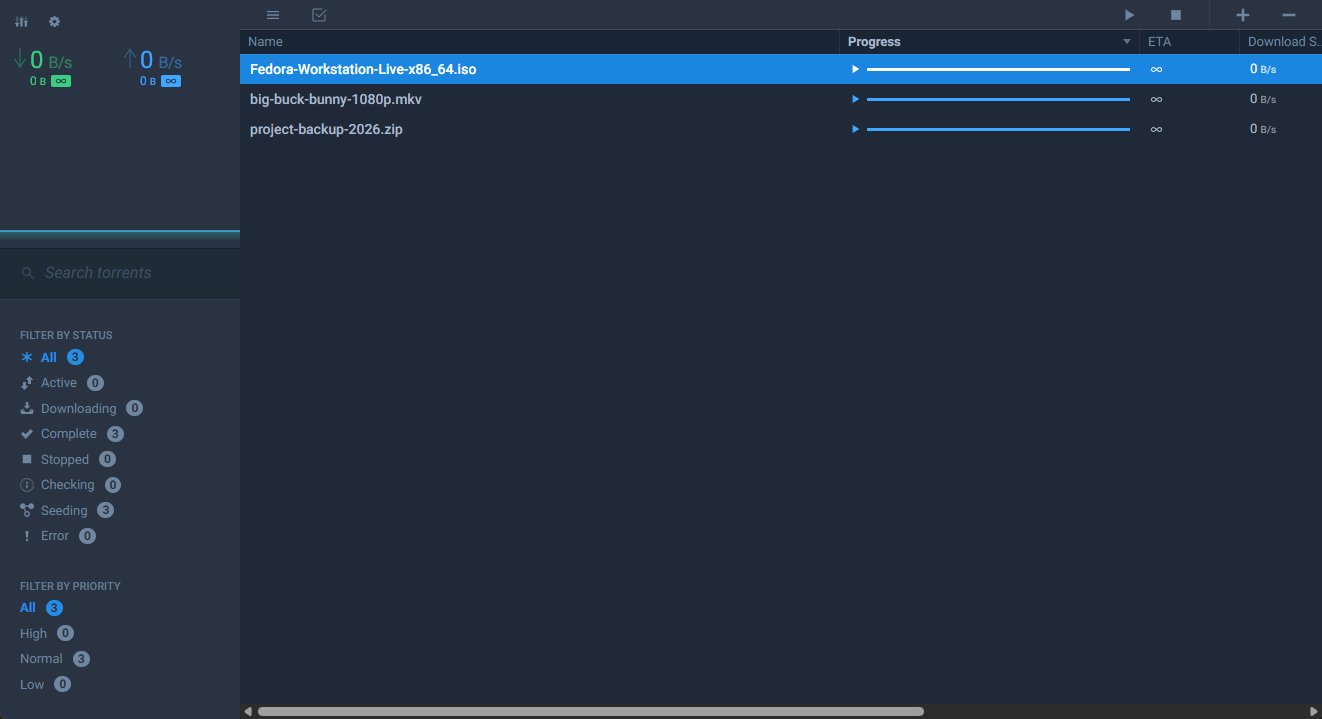
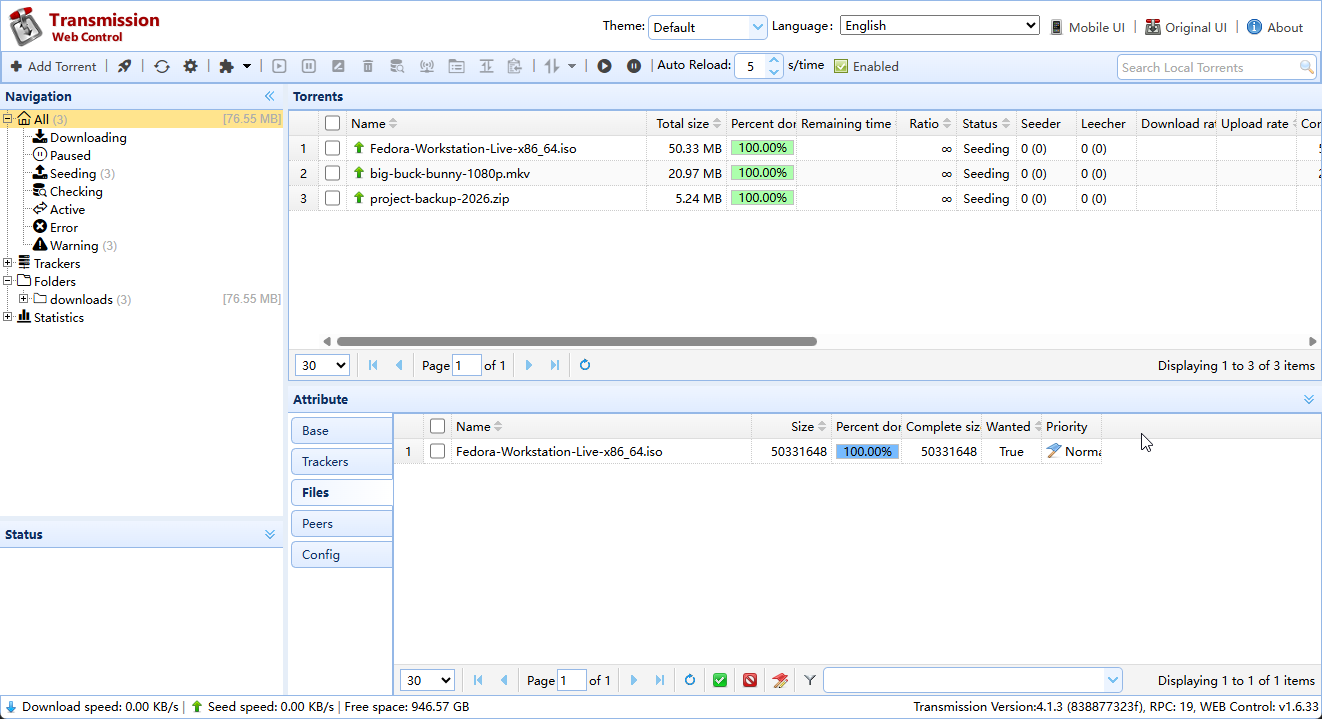
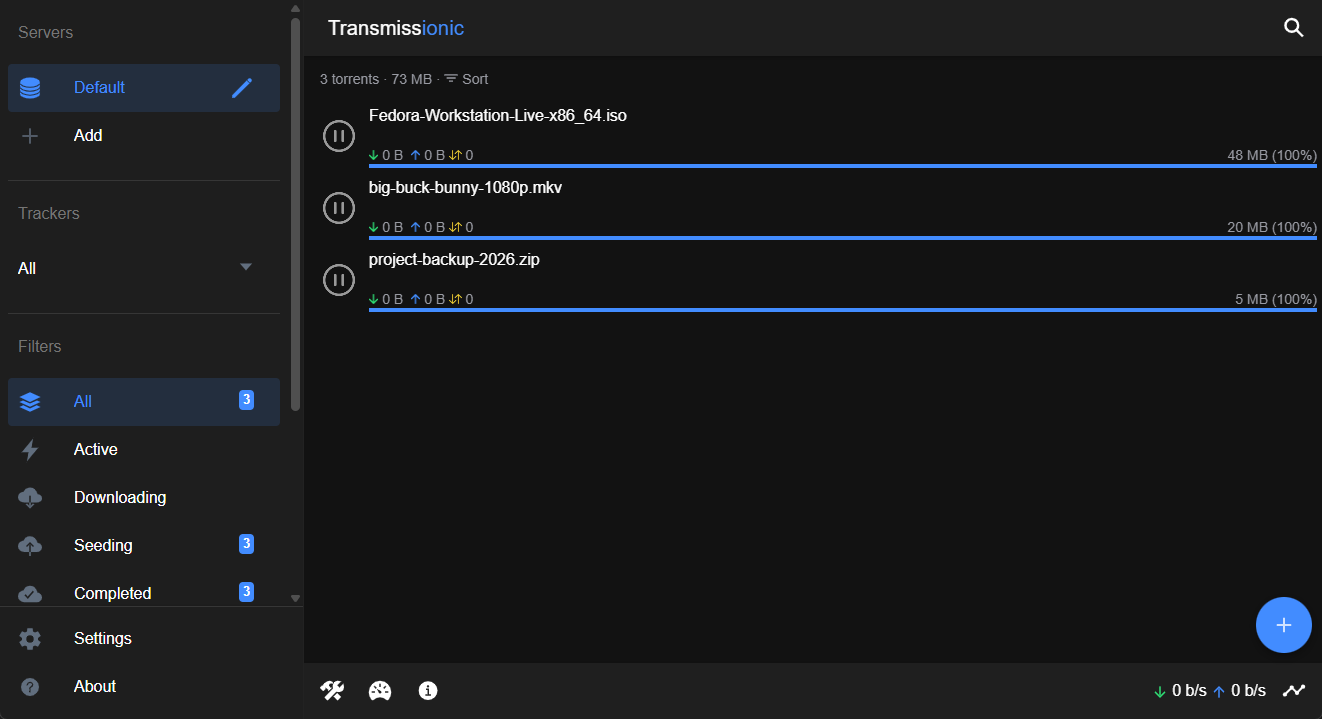
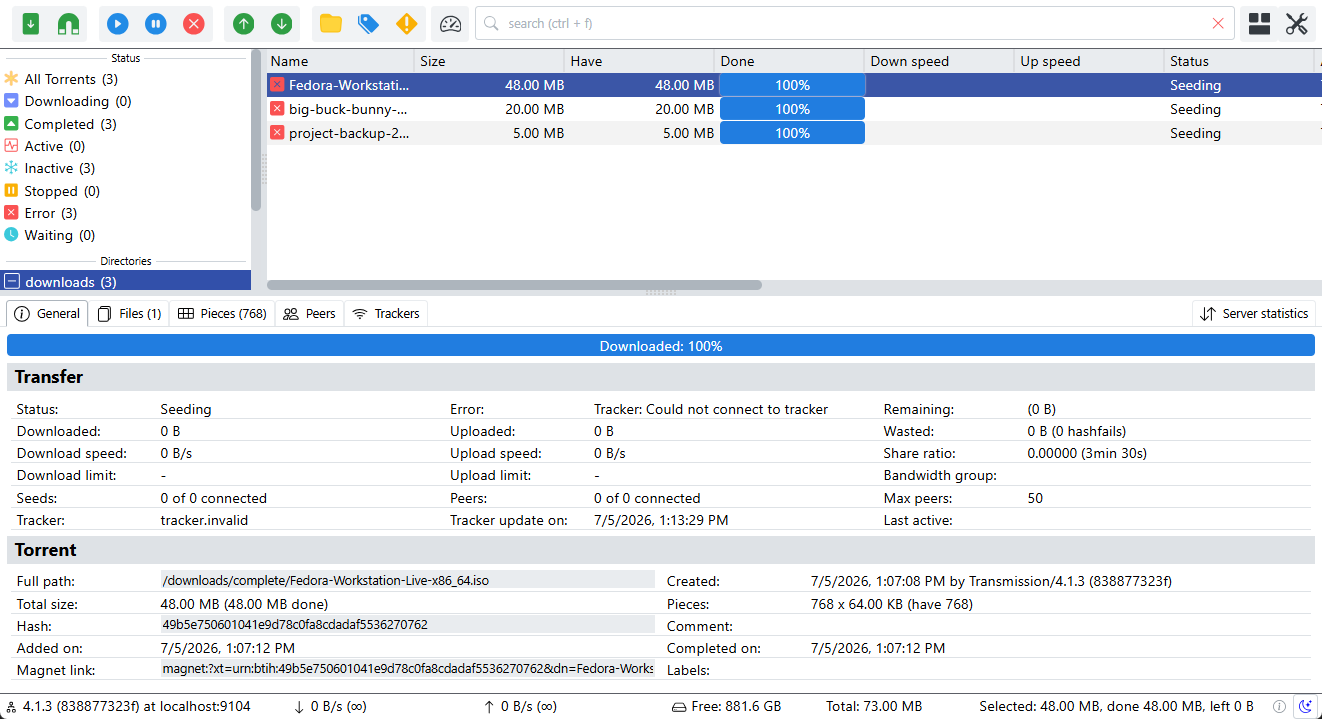
<p>Four contenders, same daemon underneath. Here’s what they look like:</p>

<div class="ui-gallery">
  <figure><a href="/assets/blog-images/transmission-ui-flood.png"><img src="/assets/blog-images/transmission-ui-flood.png" alt="Flood for Transmission" /></a><figcaption>Flood for Transmission</figcaption></figure>
  <figure><a href="/assets/blog-images/transmission-ui-web-control.png"><img src="/assets/blog-images/transmission-ui-web-control.png" alt="Transmission Web Control" /></a><figcaption>Transmission Web Control</figcaption></figure>
  <figure><a href="/assets/blog-images/transmission-ui-transmissionic.png"><img src="/assets/blog-images/transmission-ui-transmissionic.png" alt="Transmissionic" /></a><figcaption>Transmissionic</figcaption></figure>
  <figure><a href="/assets/blog-images/transmission-ui-trguing.png"><img src="/assets/blog-images/transmission-ui-trguing.png" alt="TrguiNG" /></a><figcaption>TrguiNG</figcaption></figure>
</div>

<p>And where each one lives — with how much love it’s still getting:</p>

<table>
  <thead>
    <tr>
      <th> </th>
      <th>UI</th>
      <th>Stars</th>
      <th>Source</th>
      <th>Commits</th>
      <th>Last</th>
      <th>Notes</th>
    </tr>
  </thead>
  <tbody>
    <tr>
      <td><img class="nb" height="26" src="/assets/blog-images/transmission-ui-flood-icon.png" /></td>
      <td>Flood for Transmission</td>
      <td><img class="nb" src="https://img.shields.io/github/stars/johman10/flood-for-transmission.svg?style=social&amp;label=Star" /></td>
      <td><a href="https://github.com/johman10/flood-for-transmission">johman10/flood-for-transmission</a></td>
      <td>286</td>
      <td>6 months ago</td>
      <td> </td>
    </tr>
    <tr>
      <td><img class="nb" height="26" src="/assets/blog-images/transmission-ui-web-control-icon.ico" /></td>
      <td>Transmission Web Control</td>
      <td><img class="nb" src="https://img.shields.io/github/stars/ronggang/transmission-web-control.svg?style=social&amp;label=Star" /></td>
      <td><a href="https://github.com/ronggang/transmission-web-control">ronggang/transmission-web-control</a></td>
      <td>558</td>
      <td>last year</td>
      <td>Archived 2025/6</td>
    </tr>
    <tr>
      <td><img class="nb" height="26" src="/assets/blog-images/transmission-ui-transmissionic-icon.png" /></td>
      <td>Transmissionic</td>
      <td><img class="nb" src="https://img.shields.io/github/stars/6c65726f79/Transmissionic.svg?style=social&amp;label=Star" /></td>
      <td><a href="https://github.com/6c65726f79/Transmissionic">6c65726f79/Transmissionic</a></td>
      <td>2985</td>
      <td>3 years ago</td>
      <td> </td>
    </tr>
    <tr>
      <td><img class="nb" height="26" src="/assets/blog-images/transmission-ui-trguing-icon.png" /></td>
      <td>TrguiNG</td>
      <td><img class="nb" src="https://img.shields.io/github/stars/openscopeproject/TrguiNG.svg?style=social&amp;label=Star" /></td>
      <td><a href="https://github.com/openscopeproject/TrguiNG">openscopeproject/TrguiNG</a></td>
      <td>481</td>
      <td>2 weeks ago</td>
      <td> </td>
    </tr>
  </tbody>
</table>

<h1 id="leaving-transmission">Leaving Transmission</h1>

<p>I’ve had issues with web-control in the past but now it seemed, it was also abandoned as a project…
And then it turned out that the integration between qBittorrent and the *arr family is better compared to Transmission.</p>

<ul>
  <li><strong>Categories &amp; tags</strong>: qBittorrent’s categories map each to a save path <em>and</em> line up exactly with the “category” field the *arr apps use.</li>
  <li><strong>Built-in search</strong></li>
  <li><strong>Sequential download</strong>: download first &amp; last pieces first</li>
  <li><strong>Built-in RSS auto-downloader</strong> with filter rules.</li>
</ul>

<h1 id="migrating-to-qbittorrent">Migrating to qBittorrent</h1>

<p><a href="https://github.com/qbittorrent/qBittorrent" class="github">
    <img src="https://img.shields.io/github/stars/qbittorrent/qBittorrent.svg?style=social&amp;label=Star" />
</a>
<a href="https://github.com/qbittorrent/qBittorrent">qbittorrent/qBittorrent</a>
:
    qBittorrent BitTorrent client</p>

<p>The <a href="https://docs.linuxserver.io/images/docker-qbittorrent/"><code>linuxserver/qbittorrent</code></a> service that replaced it:</p>

<pre class="line-numbers" data-file="compose.yaml"><code class="language-yaml">qbittorrent:
  image: lscr.io/linuxserver/qbittorrent
  environment:
    - PUID=${PUID}
    - PGID=${PGID}
    - TZ=${TZ}
    - WEBUI_PORT=${QBITTORRENT_PORT}
  volumes:
    - ${CONFIG_PATH}/qbittorrent:/config
    - ${DATA_PATH}:/data
  ports:
    - ${QBITTORRENT_PORT}:${QBITTORRENT_PORT}
    - 6881:6881
    - 6881:6881/udp
</code></pre>

<p>You’ll probably have to point to the correct paths in:<br />
Options &gt; Downloads &gt; Saving Management &gt; Default Save Path:</p>

<h2 id="the-first-login-gotcha">The First-Login Gotcha</h2>

<p>The admin password is printed to the docker logs at startup.</p>

<pre><code class="language-bash">docker logs qbittorrent | grep -i password
</code></pre>

<p>Set a real password immediately, or a fresh temporary one is regenerated on every restart.<br />
Options &gt; WebUI &gt; Authentication</p>

<h2 id="repointing-the-arrs">Repointing the *arrs</h2>

<p>Last step, in Sonarr, Radarr, Prowlarr, … under <strong>Settings → Download Clients</strong>: drop the Transmission client and add a
<strong>qBittorrent</strong> one (host, <code>WEBUI_PORT</code>, credentials), set a <strong>Category</strong> (ex: radarr, sonarr, …).</p>

<p>Inside qBittorrent on the left menu, right click the CATEGORIES &gt; All &gt; Add Category;
or, if the categories you entered already exist, right click them and “Edit Category…”</p>

<p>In Options &gt; Downloads &gt; Saving Management &gt; Default Torrent Management Mode: Automatic</p>

<p>And now you have a separate folder for each… Nice &amp; clean!</p>

<h1 id="conclusion">Conclusion</h1>

<p>If you’re setting up fresh: skip the detour and <strong>start on qBittorrent</strong>. The *arr integration alone is worth it.
The qBittorrent UI is also more colorful than my old web-control, so I’m definitely staying ;)</p>]]></content><author><name>Wouter Van Schandevijl</name></author><category term="torrents" /><category term="docker" /><summary type="html"><![CDATA[How Transmission 4.0 quietly killed the web UI, the linuxserver bring-your-own-UI dance that followed, and why I ended up on qBittorrent.]]></summary><media:thumbnail xmlns:media="http://search.yahoo.com/mrss/" url="https://pirateflix.sangu.be/assets/blog-images/transmission-big.webp" /><media:content medium="image" url="https://pirateflix.sangu.be/assets/blog-images/transmission-big.webp" xmlns:media="http://search.yahoo.com/mrss/" /></entry><entry><title type="html">Recyclarr: The Quality Upgrade I Said No To</title><link href="https://pirateflix.sangu.be/blog/recyclarr/" rel="alternate" type="text/html" title="Recyclarr: The Quality Upgrade I Said No To" /><published>2026-07-05T00:00:00+00:00</published><updated>2026-07-05T00:00:00+00:00</updated><id>https://pirateflix.sangu.be/blog/recyclarr</id><content type="html" xml:base="https://pirateflix.sangu.be/blog/recyclarr/"><![CDATA[<p>Every so often you find a tool that’s obviously well-made, solves a real problem, and is beloved by people who
clearly know more than you — and you still walk away. <strong>Recyclarr</strong> is mine.</p>

<!--more-->

<h1 id="what-it-does">What It Does</h1>

<p>Recyclarr automates the release grabbing process. It configures your custom formats and quality profiles,
much better than you ever can. If you do not want to spend time configuring all that, and keeping it up to date,
Recyclarr might be exactly what you need!</p>

<p>It will configure years of best practices and fine-tuning from the <a href="https://trash-guides.info/"><strong>TRaSH Guides</strong></a>
for you, automatically.</p>

<pre><code class="language-yaml">recyclarr:
  image: ghcr.io/recyclarr/recyclarr:latest
  container_name: recyclarr
  user: ${PUID}:${PGID}
  environment:
    - TZ=${TZ}
    - CRON_SCHEDULE=${RECYCLARR_CRON}
  volumes:
    - ${CONFIG_PATH}/recyclarr:/config
  restart: ${RESTART_POLICY}
</code></pre>

<p>One-shot instead of cron? Just <code>docker compose run --rm recyclarr sync</code>.</p>

<h1 id="why-i-said-no">Why I Said No</h1>

<p>I fall firmly on the <strong>quantity over quality</strong> side. Fill the terabytes, watch the thing, move on.
Recyclarr and the TRaSH guides point towards 4k releases or something, with 14GB movies as pretty much
the bare minimum. I’m typically aiming for a 2GB release, which, for me, is just good enough.</p>

<p>A side effect of me being so picky on “bad quality” is that it is often <strong>more</strong> difficult for me
to find a release…</p>

<h1 id="when-you-should-use-it">When You <em>Should</em> Use It</h1>

<p>This is a “me” problem, not a Recyclarr problem. If any of this is you, go for it — it’ll save you real time:</p>

<ul>
  <li>You care about <strong>specific encodes</strong> — HDR/Dolby Vision done right, lossless audio, trusted release groups.</li>
  <li>Storage is plentiful and you’d rather <strong>re-grab an upgrade</strong> than settle.</li>
  <li>You’ve been <strong>hand-maintaining custom formats</strong> and are tired of it.</li>
</ul>

<p>For that person Recyclarr is a no-brainer: the TRaSH Guides are the accumulated taste of thousands of hoarders, and
Recyclarr pipes it into your setup automatically.</p>

<h1 id="conclusion">Conclusion</h1>

<p>Recyclarr isn’t going in my stack — not because it’s bad, but because it’s <em>good at something I don’t want</em>.</p>]]></content><author><name>Wouter Van Schandevijl</name></author><category term="arr" /><category term="automation" /><summary type="html"><![CDATA[Recyclarr auto-syncs the TRaSH Guides quality tuning into Sonarr and Radarr. It's genuinely clever — and I decided not to use it. Here's both halves.]]></summary><media:thumbnail xmlns:media="http://search.yahoo.com/mrss/" url="https://pirateflix.sangu.be/assets/blog-images/recyclarr-big.webp" /><media:content medium="image" url="https://pirateflix.sangu.be/assets/blog-images/recyclarr-big.webp" xmlns:media="http://search.yahoo.com/mrss/" /></entry><entry><title type="html">Jellyfin on LG Smart TV</title><link href="https://pirateflix.sangu.be/blog/lg-smart-tv/" rel="alternate" type="text/html" title="Jellyfin on LG Smart TV" /><published>2022-10-29T00:00:00+00:00</published><updated>2022-10-29T00:00:00+00:00</updated><id>https://pirateflix.sangu.be/blog/lg-smart-tv</id><content type="html" xml:base="https://pirateflix.sangu.be/blog/lg-smart-tv/"><![CDATA[<p class="notice--danger hide-from-excerpt">If you have a Smart TV with <strong>webOS 6+</strong>, do not follow these instructions
but install it from the <strong>official LG Content Store</strong> instead!</p>

<h1 class="hide-from-excerpt" id="tldr">TL&amp;DR</h1>

<p>Following these steps should get you up &amp; running in no time.</p>

<ul>
  <li>PC: <a href="https://us.lgaccount.com/login/sign_in">Create a Developer Account</a></li>
  <li>TV: Install “Developer Mode” from the LG Content Store
    <ul>
      <li>Turn on Developer Mode and Key Server</li>
      <li>(1): Write down the Passphrase</li>
    </ul>
  </li>
  <li>TV (2): All Settings &gt; Network &gt; Wi-Fi Connection &gt; Advanced Wi-Fi Settings &gt; IP Address</li>
  <li>PC: Start <a href="https://github.com/webosbrew/dev-manager-desktop/releases/latest">Device Manager for webOS</a>
    <ul>
      <li>Add Device: Use TV IP Address and Passphrase from steps (1) and (2)</li>
      <li>Apps &gt; Install &gt; Available &gt; Jellyfin</li>
      <li>Launch and 🎉</li>
    </ul>
  </li>
  <li>PC: Remedy 50h Developer Mode timeout</li>
</ul>

<!--more-->

<h1 id="installation">Installation</h1>

<p>Follow the instructions from the TL&amp;DR ;)<br />
If that’s too cryptic, you can find step by step instructions
in the <a href="https://webostv.developer.lge.com/develop/getting-started/developer-mode-app">official docs</a>.
They also cover configuring your CLI or IDE.</p>

<h2 id="developer-mode">Developer Mode</h2>

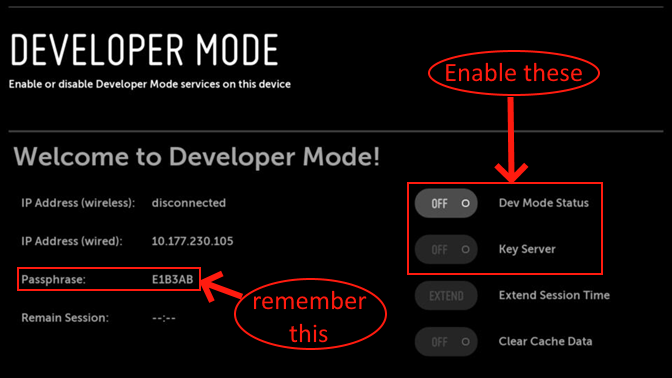
<p>After installing “Developer Mode” from the LG Content Store:</p>

<p><img src="/assets/blog-images/LG-DevMode.png" alt="Developer Mode Settings" title="Developer Mode Settings" /></p>

<h2 id="device-manager-for-webos">Device Manager for webOS</h2>

<p><a href="https://github.com/webosbrew/dev-manager-desktop" class="github">
    <img src="https://img.shields.io/github/stars/webosbrew/dev-manager-desktop.svg?style=social&amp;label=Star" />
</a>
<a href="https://github.com/webosbrew/dev-manager-desktop">webosbrew/dev-manager-desktop</a>
:
    Device/DevMode Manager for webOS TV</p>

<p>Many ways to install Jellyfin, this Desktop UI makes it particularly easy. Check the official docs for screenshots on installation.</p>

<p>Note that you can leave the settings in “Add Device” not mentioned in the TL&amp;DR as is:</p>
<ul>
  <li>Port Number: 9992</li>
  <li>SSH Username: prisoner</li>
  <li>Authentication Method: Official Dev Mode</li>
</ul>

<p>The others:</p>
<ul>
  <li>Host Address: The IP is hidden under “Advanced Wi-Fi Settings” on your TV.</li>
  <li>Passphrase: The one displayed in the “Developer Mode” app you downloaded in the LG Content Store</li>
</ul>

<h3 id="manual-ipk">Manual ipk</h3>

<p>If you don’t want to install it from the “Available” tab:</p>

<ul>
  <li>Download <a href="https://github.com/jellyfin/jellyfin-webos/releases/latest">Jellyfin <code>org.jellyfin.webos_x.x.x_all.ipk</code></a></li>
  <li>Device Manager for webOS &gt; Apps &gt; Install &gt; Select <code>.ipk</code></li>
</ul>

<h1 id="automated-refresh">Automated Refresh</h1>

<p>You basically do not want to turn on Developer Mode again every 50 hours…</p>

<p>A few ways of remedying this:</p>

<h2 id="device-manager-for-webos-1">Device Manager for webOS</h2>

<p>Again to the rescue!!</p>

<p>Info &gt; Dev Mode &gt; Renew Automatically…</p>

<p>It offers two possibilities:</p>
<ul>
  <li>Using <a href="https://ifttt.com/">ifttt</a></li>
  <li>Using a <a href="/assets/lgtv-renew-developer-mode.sh">shell script</a> (schedule with a cron job)</li>
</ul>

<h2 id="rootmytv">RootMyTV</h2>

<p>Open the TV browser and surf to <a href="https://rootmy.tv/">RootMy.Tv</a>…<br />
This automatically extends Developer Mode, plus you can now install stuff from the unofficial <a href="https://www.webosbrew.org">webOS Homebrew Project</a>.</p>

<p><a href="https://github.com/RootMyTV/RootMyTV.github.io" class="github">
    <img src="https://img.shields.io/github/stars/RootMyTV/RootMyTV.github.io.svg?style=social&amp;label=Star" />
</a>
<a href="https://github.com/RootMyTV/RootMyTV.github.io">RootMyTV/RootMyTV.github.io</a>
:
    RootMyTV is a user-friendly exploit for rooting/jailbreaking LG webOS smart TVs.</p>

<p><a href="https://github.com/webosbrew/webos-homebrew-channel" class="github">
    <img src="https://img.shields.io/github/stars/webosbrew/webos-homebrew-channel.svg?style=social&amp;label=Star" />
</a>
<a href="https://github.com/webosbrew/webos-homebrew-channel">webosbrew/webos-homebrew-channel</a>
:
    Unofficial webOS TV homebrew store and root-related tooling</p>

<h2 id="other">Other</h2>

<ul>
  <li><a href="https://www.home-assistant.io/">Home Assistant</a> integration <a href="https://github.com/koying/jellyfin_ha">Jellyfin_HA</a></li>
  <li><a href="https://webosapp.club/timer/">webOS App Club</a>: This is a Russian site without Github links, so I didn’t try it out</li>
  <li><a href="https://github.com/SR-Lut3t1um/Webos-renew-dev/">Manual instructions</a> in this Github README</li>
</ul>]]></content><author><name>Wouter Van Schandevijl</name></author><category term="jellyfin" /><category term="hardware" /><summary type="html"><![CDATA[For webOS 6, get it from the official LG Content Store. If not, get ready to become a webOS TV Developer!]]></summary><media:thumbnail xmlns:media="http://search.yahoo.com/mrss/" url="https://pirateflix.sangu.be/assets/blog-images/JellyfinLG-big.png" /><media:content medium="image" url="https://pirateflix.sangu.be/assets/blog-images/JellyfinLG-big.png" xmlns:media="http://search.yahoo.com/mrss/" /></entry><entry><title type="html">Make Radarr/Sonarr UI Obsolete with integrations (Part 2)</title><link href="https://pirateflix.sangu.be/blog/lists-part2/" rel="alternate" type="text/html" title="Make Radarr/Sonarr UI Obsolete with integrations (Part 2)" /><published>2022-10-02T00:00:00+00:00</published><updated>2022-10-02T00:00:00+00:00</updated><id>https://pirateflix.sangu.be/blog/lists-part2</id><content type="html" xml:base="https://pirateflix.sangu.be/blog/lists-part2/"><![CDATA[<p>Lists are great for integrating with your IMDB Watchlist and for following automated lists.<br />
While lists can be filtered on Genre, Year(s) etc, which filters are available depends on the
source (ex: IMDB vs TMDB) but is typically rather limited.</p>

<p>Let’s have a look at some projects that can help with populating Sonarr/Radarr in a manual or automated way.</p>

<!--more-->

<h1 id="containers">Containers</h1>

<h2 id="seerr">Seerr</h2>

<p><img src="/assets/seerr.png" alt="Seerr Logo" title="Seerr Logo" style="float: left; margin-right: 16px; width: 50px" /></p>

<p><a href="https://github.com/seerr-team/seerr" class="github">
    <img src="https://img.shields.io/github/stars/seerr-team/seerr.svg?style=social&amp;label=Star" />
</a>
<a href="https://github.com/seerr-team/seerr">seerr-team/seerr</a>
:
    Request management and media discovery for Plex, Jellyfin and Emby</p>

<p><code>Seerr</code> is where things are headed: the Overseerr and Jellyseerr teams merged into
one project with a single shared codebase.</p>

<p><a href="https://github.com/sct/overseerr" class="github">
    <img src="https://img.shields.io/github/stars/sct/overseerr.svg?style=social&amp;label=Star" />
</a>
<a href="https://github.com/sct/overseerr">sct/overseerr</a>
:
    Request management and media discovery tool for the Plex ecosystem</p>

<p><a href="https://github.com/Fallenbagel/jellyseerr" class="github">
    <img src="https://img.shields.io/github/stars/Fallenbagel/jellyseerr.svg?style=social&amp;label=Star" />
</a>
<a href="https://github.com/Fallenbagel/jellyseerr">Fallenbagel/jellyseerr</a>
:
    Fork of Overseerr for jellyfin support</p>

<p><a href="https://seerr.dev/">Checkout the UI</a></p>

<h2 id="suggestarr">SuggestArr</h2>

<p><a href="https://github.com/giuseppe99barchetta/SuggestArr" class="github">
    <img src="https://img.shields.io/github/stars/giuseppe99barchetta/SuggestArr.svg?style=social&amp;label=Star" />
</a>
<a href="https://github.com/giuseppe99barchetta/SuggestArr">giuseppe99barchetta/SuggestArr</a>
:
    Reads your Jellyfin/Plex/Emby watch history and auto-requests similar titles into Seerr.</p>

<p>Seerr is the request box; <strong>SuggestArr</strong> is what fills it <em>for</em> you. It reads your Jellyfin watch history and
automatically requests similar titles into Seerr, which hands them off to Sonarr/Radarr. Nobody has to search for
anything — the library just refills itself in the background. Quantity-over-quality as a running container, which is
rather the whole point around here.</p>

<h2 id="discord">Discord</h2>

<p><a href="https://github.com/activexray/Doplarr" class="github">
    <img src="https://img.shields.io/github/stars/activexray/Doplarr.svg?style=social&amp;label=Star" />
</a>
<a href="https://github.com/activexray/Doplarr">activexray/Doplarr</a>
:
    An *arr request bot for Discord</p>

<p><a href="https://github.com/activexray/doplarr_rs" class="github">
    <img src="https://img.shields.io/github/stars/activexray/doplarr_rs.svg?style=social&amp;label=Star" />
</a>
<a href="https://github.com/activexray/doplarr_rs">activexray/doplarr_rs</a>
:
    Rust rewrite of Doplarr</p>

<h2 id="autobrr">autobrr</h2>

<p><img src="/assets/blog-images/autobrr-logo.png" alt="autobrr Logo" title="autobrr Logo" style="float: left; margin-right: 16px; width: 50px" /></p>

<p><a href="https://github.com/autobrr/autobrr" class="github">
    <img src="https://img.shields.io/github/stars/autobrr/autobrr.svg?style=social&amp;label=Star" />
</a>
<a href="https://github.com/autobrr/autobrr">autobrr/autobrr</a>
:
    Modern download automation: monitors IRC announce channels and RSS feeds in real time and grabs releases matching your filters.</p>

<p>The spiritual successor to <code>autodl-irssi</code> and FlexGet for the race-to-download crowd: instead of following lists, autobrr
watches tracker announce channels live and instantly grabs anything matching your filters, straight into qBittorrent/Sonarr/Radarr.
Also handles cross-seeding.</p>

<h1 id="deprecated">Deprecated</h1>

<p><a href="https://github.com/JagandeepBrar/LunaSea" class="github">
    <img src="https://img.shields.io/github/stars/JagandeepBrar/LunaSea.svg?style=social&amp;label=Star" />
</a>
<a href="https://github.com/JagandeepBrar/LunaSea">JagandeepBrar/LunaSea</a>
:
    Self-hosted software controller built using Flutter</p>

<p><a href="https://github.com/l3uddz/traktarr" class="github">
    <img src="https://img.shields.io/github/stars/l3uddz/traktarr.svg?style=social&amp;label=Star" />
</a>
<a href="https://github.com/l3uddz/traktarr">l3uddz/traktarr</a>
:
    Script to add new series &amp; movies to Sonarr/Radarr based on Trakt lists.</p>

<p><a href="https://github.com/petio-team/petio" class="github">
    <img src="https://img.shields.io/github/stars/petio-team/petio.svg?style=social&amp;label=Star" />
</a>
<a href="https://github.com/petio-team/petio">petio-team/petio</a>
:
    Petio Request, Discover, Review (for Plex)</p>

<h2 id="ombi">Ombi</h2>

<p><img src="/assets/blog-images/Home Media Center-Ombi-Logo.png" alt="Ombi Logo" title="Ombi Logo" style="float: left; margin-right: 16px; width: 50px" /></p>

<p><a href="https://github.com/Ombi-app/Ombi" class="github">
    <img src="https://img.shields.io/github/stars/Ombi-app/Ombi.svg?style=social&amp;label=Star" />
</a>
<a href="https://github.com/Ombi-app/Ombi">Ombi-app/Ombi</a>
:
    Want a Movie or TV Show on Plex/Emby/Jellyfin? Use Ombi!</p>

<p>Ombi was already mentioned in earlier articles as something that you’d give to your spouse so s/he can easily request
or directly download stuff without having to know about the complexities of Sonarr/Radarr.</p>

<p>But Ombi can be great for yourself as well, it has an easy-to-use interface for discovering new things
which you can then send directly to Radarr/Sonarr.</p>

<p><a href="https://ombi.io/">Checkout the live demo</a></p>]]></content><author><name>Wouter Van Schandevijl</name></author><category term="arr" /><category term="automation" /><category term="docker" /><summary type="html"><![CDATA[Some *Arr and other projects that can help you fill those hard disks without having to search for content yourself.]]></summary><media:thumbnail xmlns:media="http://search.yahoo.com/mrss/" url="https://pirateflix.sangu.be/assets/blog-images/integrations-lists2-big.webp" /><media:content medium="image" url="https://pirateflix.sangu.be/assets/blog-images/integrations-lists2-big.webp" xmlns:media="http://search.yahoo.com/mrss/" /></entry><entry><title type="html">Make Radarr/Sonarr UI Obsolete with Lists</title><link href="https://pirateflix.sangu.be/blog/lists/" rel="alternate" type="text/html" title="Make Radarr/Sonarr UI Obsolete with Lists" /><published>2022-09-28T00:00:00+00:00</published><updated>2022-09-28T00:00:00+00:00</updated><id>https://pirateflix.sangu.be/blog/lists</id><content type="html" xml:base="https://pirateflix.sangu.be/blog/lists/"><![CDATA[<p>Connect Radarr/Sonarr to IMDB, TrakTV and other lists so you basically never have to open their UI ever again.
You add that crazy movie to your IMDB watchlist and Radarr picks it up!</p>

<!--more-->

<h1 id="initial-setup">Initial Setup</h1>

<p>Setting up Radarr/Sonarr et al is quite easy and fast with a <code>docker-compose</code> but after that..
The configuring begins. It takes some time to setup Heimdall, Sonarr, Radarr, connect the indexers
and download clients etc.</p>

<p>After that you need some additional configuration with Profiles and Quality: it takes some tinkering
before it starts downloading files that exactly match your quality and file size requirements.</p>

<p>Once all that is setup to your hearts content though, you only really need to access Radarr/Sonarr
when there is something new you want to follow or download.</p>

<p>Or is it?</p>

<h1 id="configuring-lists">Configuring Lists</h1>

<p>Go to <code>Settings &gt; (Import) Lists</code></p>

<p class="notice--info"><strong>Worth noting</strong>:<br />
Perhaps you want to follow a list but not everything. This is of course possible.
Filter entries in the lists based on their Rating, Genres, Year(s), or just a hard max limit.</p>

<p class="notice--info"><strong>Advanced Lists Options</strong>:<br />
<strong>List Update Interval</strong>: Radarr/Sonarr will only check every x hours for changes on your lists<br />
<strong>Clean Library Level</strong>: if you follow “IMDB Popular Movies” together with this setting, you will always only have 100 movies on your hard disk.
Use this if you have limited storage capacity!</p>

<h2 id="autoconfigured">Autoconfigured</h2>

<p>Follow these lists with just a few clicks:</p>

<ul>
  <li>IMDB
    <ul>
      <li><a href="https://www.imdb.com/chart/top/">IMDB Top250</a></li>
      <li><a href="https://www.imdb.com/chart/moviemeter/">IMDB Popular Movies</a></li>
      <li>Any list created by any user</li>
    </ul>
  </li>
  <li>Trakt.tv
    <ul>
      <li><a href="https://trakt.tv/movies/popular">TrakTV Popular</a>, Trending, Anticipated</li>
      <li>TopWatched: By Week/Month/Year/All Time</li>
      <li>Recommended: By Week/…</li>
      <li>A Specific User or List</li>
    </ul>
  </li>
  <li>TMDB
    <ul>
      <li>A specific User, List, Person, Company, Collection or Keyword</li>
      <li>Popular, Theaters, Upcoming, Top</li>
    </ul>
  </li>
  <li><a href="https://movies.stevenlu.com/">StevenLu</a>: An algorithmic list of movies that look popular by a numeric heuristic.</li>
  <li>Plex Watchlist</li>
  <li>more…</li>
</ul>

<h2 id="your-imdb-watchlist">Your IMDB Watchlist</h2>

<p>Add at: Settings &gt; Lists &gt; IMDb Lists &gt; Custom</p>

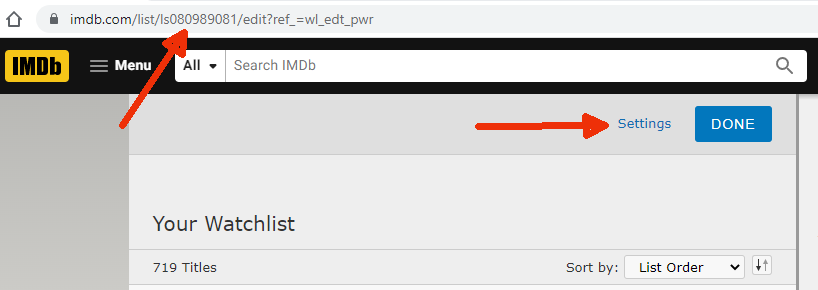
<p>After creating your IMDB account, go to your watchlist and click <code>Edit</code>:</p>

<p><img src="/assets/blog-images/Lists-Imdb-Watchlist.png" alt="IMDB - Edit your watchlist" title="IMDB - Edit your watchlist" class="img-responsive" /></p>

<p>Once on the edit screen:</p>

<ul>
  <li>Note the <code>lsXXXXXXXX</code> number in the URI – this is the <code>List/User ID</code> you need to add in Radarr</li>
  <li>Click on the <code>Settings</code> button and make your list publicly available so Radarr can reach it</li>
</ul>

<p><img src="/assets/blog-images/Lists-Imdb-Watchlist-MakePublic.png" alt="IMDB - Edit your watchlist" title="IMDB - Edit your watchlist" class="img-responsive" /></p>

<p>Then once in IMDB, click on the top left corner of a movie poster to have it added to Radarr!</p>

<p><img src="/assets/blog-images/Lists-Imdb-Watchlist-Example.png" alt="IMDB - Watchlist" title="IMDB - Watchlist" /></p>

<h2 id="trakttv-directors">Trakt.tv Directors</h2>

<p>User <a href="https://trakt.tv/users/origin14/lists">origin14 on Trakt.tv</a> manually maintains a list of movies made by famous directors.</p>

<p>Add a <code>Trakt List</code> with <code>Username: origin14</code> and <code>List name</code> one of the following:</p>

<ul>
  <li><a href="https://trakt.tv/users/origin14/lists/director-martin-scorsese?sort=released,asc">director-martin-scorsese</a></li>
  <li><a href="https://trakt.tv/users/origin14/lists/director-steven-spielberg?sort=released,asc">director-steven-spielberg</a></li>
  <li><a href="https://trakt.tv/users/origin14/lists/director-clint-eastwood?sort=released,asc">director-clint-eastwood</a></li>
  <li><a href="https://trakt.tv/users/origin14/lists/director-roman-polanski?sort=released,asc">director-roman-polanski</a></li>
  <li><a href="https://trakt.tv/users/origin14/lists/director-ang-lee?sort=released,asc">director-ang-lee</a></li>
  <li><a href="https://trakt.tv/users/origin14/lists/director-ridley-scott?sort=released,asc">director-ridley-scott</a></li>
  <li><a href="https://trakt.tv/users/origin14/lists/director-alfred-hitchcock-f5cc82a7-e0a2-4aea-8396-9f42fb39399b?sort=released,asc">director-alfred-hitchcock-f5cc82a7-e0a2-4aea-8396-9f42fb39399b</a></li>
  <li><a href="https://trakt.tv/users/origin14/lists/director-david-fincher?sort=released,asc">director-david-fincher</a></li>
  <li><a href="https://trakt.tv/users/origin14/lists/director-tim-burton?sort=released,asc">director-tim-burton</a></li>
  <li><a href="https://trakt.tv/users/origin14/lists/director-ron-howard?sort=released,asc">director-ron-howard</a></li>
  <li><a href="https://trakt.tv/users/origin14/lists/director-woody-allen?sort=released,asc">director-woody-allen</a></li>
  <li><a href="https://trakt.tv/users/origin14/lists/director-john-carpenter?sort=released,asc">director-john-carpenter</a></li>
  <li><a href="https://trakt.tv/users/origin14/lists/director-denis-villeneuve?sort=released,asc">director-denis-villeneuve</a></li>
  <li><a href="https://trakt.tv/users/origin14/lists/director-robert-rodriguez?sort=released,asc">director-robert-rodriguez</a></li>
  <li><a href="https://trakt.tv/users/origin14/lists/director-david-cronenberg?sort=released,asc">director-david-cronenberg</a></li>
  <li><a href="https://trakt.tv/users/origin14/lists/director-wes-craven?sort=released,asc">director-wes-craven</a></li>
  <li><a href="https://trakt.tv/users/origin14/lists/director-danny-boyle?sort=released,asc">director-danny-boyle</a></li>
  <li><a href="https://trakt.tv/users/origin14/lists/director-rob-reiner?sort=released,asc">director-rob-reiner</a></li>
  <li><a href="https://trakt.tv/users/origin14/lists/director-sam-raimi?sort=released,asc">director-sam-raimi</a></li>
  <li><a href="https://trakt.tv/users/origin14/lists/director-oliver-stone?sort=released,asc">director-oliver-stone</a></li>
  <li><a href="https://trakt.tv/users/origin14/lists/director-gareth-evans?sort=released,asc">director-gareth-evans</a></li>
  <li><a href="https://trakt.tv/users/origin14/lists/director-m-night-shyamalan?sort=released,asc">director-m-night-shyamalan</a></li>
  <li><a href="https://trakt.tv/users/origin14/lists/director-michael-bay?sort=released,asc">director-michael-bay</a></li>
  <li><a href="https://trakt.tv/users/origin14/lists/director-mel-brooks?sort=released,asc">director-mel-brooks</a></li>
  <li><a href="https://trakt.tv/users/origin14/lists/director-stanley-kubrick?sort=released,asc">director-stanley-kubrick</a></li>
  <li><a href="https://trakt.tv/users/origin14/lists/director-david-lynch?sort=released,asc">director-david-lynch</a></li>
  <li><a href="https://trakt.tv/users/origin14/lists/director-terry-gilliam?sort=released,asc">director-terry-gilliam</a></li>
  <li><a href="https://trakt.tv/users/origin14/lists/director-coen-brothers?sort=released,asc">director-coen-brothers</a></li>
  <li><a href="https://trakt.tv/users/origin14/lists/director-quentin-tarantino?sort=released,asc">director-quentin-tarantino</a></li>
  <li><a href="https://trakt.tv/users/origin14/lists/director-peter-jackson?sort=released,asc">director-peter-jackson</a></li>
  <li><a href="https://trakt.tv/users/origin14/lists/director-taika-waititi?sort=released,asc">director-taika-waititi</a></li>
  <li><a href="https://trakt.tv/users/origin14/lists/director-george-lucas?sort=released,asc">director-george-lucas</a></li>
  <li><a href="https://trakt.tv/users/origin14/lists/director-guillermo-del-toro?sort=released,asc">director-guillermo-del-toro</a></li>
  <li><a href="https://trakt.tv/users/origin14/lists/director-peter-weir?sort=released,asc">director-peter-weir</a></li>
  <li><a href="https://trakt.tv/users/origin14/lists/director-christopher-nolan?sort=released,asc">director-christopher-nolan</a></li>
  <li><a href="https://trakt.tv/users/origin14/lists/director-akira-kurosawa?sort=released,asc">director-akira-kurosawa</a></li>
  <li><a href="https://trakt.tv/users/origin14/lists/director-lars-von-trier?sort=released,asc">director-lars-von-trier</a></li>
  <li><a href="https://trakt.tv/users/origin14/lists/director-francis-ford-coppola?sort=released,asc">director-francis-ford</a></li>
  <li><a href="https://trakt.tv/users/origin14/lists/director-james-cameron?sort=released,asc">director-james-cameron</a></li>
  <li><a href="https://trakt.tv/users/origin14/lists/director-steven-soderbergh?sort=released,asc">director-steven-soderbergh</a></li>
  <li><a href="https://trakt.tv/users/origin14/lists/director-paul-thomas-anderson?sort=released,asc">director-paul-thomas-anderson</a></li>
  <li><a href="https://trakt.tv/users/origin14/lists/director-jim-jarmusch?sort=released,asc">director-jim-jarmusch</a></li>
  <li><a href="https://trakt.tv/users/origin14/lists/director-robert-altman?sort=released,asc">director-robert-altman</a></li>
  <li><a href="https://trakt.tv/users/origin14/lists/director-guy-ritchie?sort=released,asc">director-guy-ritchie</a></li>
  <li><a href="https://trakt.tv/users/origin14/lists/director-michael-mann?sort=released,asc">director-michael-mann</a></li>
  <li><a href="https://trakt.tv/users/origin14/lists/director-wes-anderson?sort=released,asc">director-wes-anderson</a></li>
  <li><a href="https://trakt.tv/users/origin14/lists/director-lee-chang-dong?sort=released,asc">director-lee-chang-dong</a></li>
  <li><a href="https://trakt.tv/users/origin14/lists/director-darren-aronofsky?sort=released,asc">director-darren-aronofsky</a></li>
  <li><a href="https://trakt.tv/users/origin14/lists/director-kathryn-bigelow?sort=rank,asc">director-kathryn-bigelow</a></li>
  <li><a href="https://trakt.tv/users/origin14/lists/director-andrei-tarkovsky?sort=rank,asc">director-andrei-tarkovsky</a></li>
  <li><a href="https://trakt.tv/users/origin14/lists/director-luc-besson?sort=released,asc">director-luc-besson</a></li>
  <li><a href="https://trakt.tv/users/origin14/lists/director-brian-de-palma?sort=released,asc">director-brian-de-palma</a></li>
</ul>]]></content><author><name>Wouter Van Schandevijl</name></author><category term="arr" /><category term="automation" /><summary type="html"><![CDATA[Update your movies/series collection automatically by following lists. Lists that are updated by either you, someone else or by an automated system.]]></summary><media:thumbnail xmlns:media="http://search.yahoo.com/mrss/" url="https://pirateflix.sangu.be/assets/blog-images/pvr-lists-big.webp" /><media:content medium="image" url="https://pirateflix.sangu.be/assets/blog-images/pvr-lists-big.webp" xmlns:media="http://search.yahoo.com/mrss/" /></entry><entry><title type="html">So… What ARE these Arr’s doing?</title><link href="https://pirateflix.sangu.be/blog/notifications/" rel="alternate" type="text/html" title="So… What ARE these Arr’s doing?" /><published>2022-09-27T00:00:00+00:00</published><updated>2022-09-27T00:00:00+00:00</updated><id>https://pirateflix.sangu.be/blog/notifications</id><content type="html" xml:base="https://pirateflix.sangu.be/blog/notifications/"><![CDATA[<p>When a new Futurama episode comes out after a 10 year hiatus,
how can the Arr-family help you not miss this major event?</p>

<h1 id="connections">Connections</h1>

<p>Pretty simple, connect Sonarr, Radarr etc to your favourite application!</p>

<p>Many options are provided out of the box like Twitter,
Discord, Slack, Telegram, Email, Synology, Plex, …</p>

<!--more-->

<p>If your “thing” is not supported, there is also the option for
executing a <a href="https://wiki.servarr.com/sonarr/custom-scripts">custom script</a>
or using a WebHook.</p>

<p>There are multiple <a href="https://wiki.servarr.com/sonarr/settings#connections">triggers</a> for sending a notification.
The most useful is probably:</p>

<p><strong>On Import</strong> - {Formerly Known as On Download} Be notified when episodes/movies are successfully imported.</p>

<h2 id="slack">Slack</h2>

<p>One of the predefined Connections. The only thing you really need to configure is the Slack WebHook.<br />
Which looks like this:</p>

<pre><code class="language-sh">https://hooks.slack.com/services/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
</code></pre>

<p>Follow their <a href="https://api.slack.com/messaging/webhooks">official instructions</a>:</p>

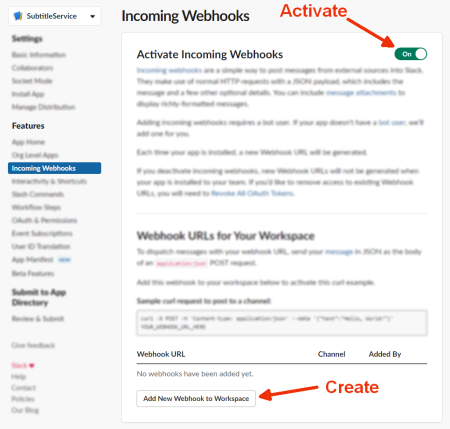
<ul>
  <li><a href="https://api.slack.com/apps?new_app=1">Create An App</a></li>
  <li>Features &gt; Incoming Webhooks
    <ul>
      <li>Activate Incoming Webhooks</li>
      <li>Add New Webhook to Workspace</li>
      <li>Copy the url!</li>
    </ul>
  </li>
</ul>

<p><img src="/assets/blog-images/Connections-Slack-Setup.png" alt="Activating Slack Webhook" title="Activating Slack Webhook" class="img-responsive" /></p>

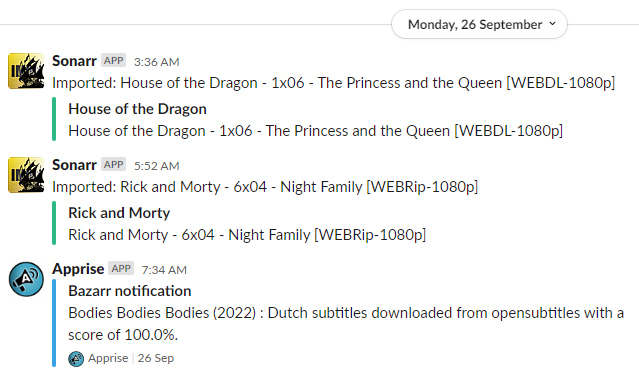
<p><strong>What can you expect</strong>:</p>

<p>Something like this:<br />
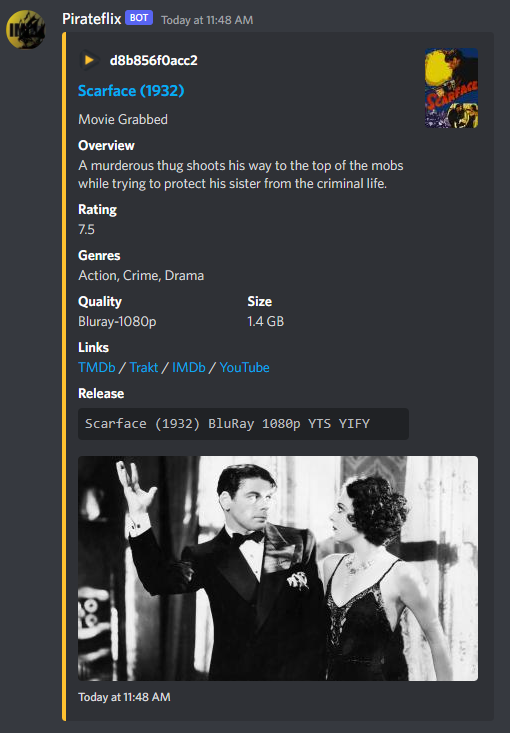
For movies you often even get a poster picture etc!</p>

<p><img src="/assets/blog-images/Connections-Slack-Result.png" alt="Slack Webhook example" title="Slack Webhook example" class="img-responsive" /></p>

<p class="notice--info"><strong>Tip:</strong> Instead of a plain incoming webhook, you can wire the notifications through a proper Slack <strong>app/bot</strong>
(with a <code>xoxb-</code> bot token) for richer, better-looking messages like you get with the Discord integration.</p>

<h2 id="discord">Discord</h2>

<ul>
  <li>Setup your own Discord server</li>
  <li>Add your pirate text channel</li>
  <li>Open your server Settings</li>
  <li>Server Settings &gt; Integrations
    <ul>
      <li>Create Webhook</li>
      <li>Pick a cool icon etc</li>
      <li>Copy Webhook URL</li>
      <li>Save Changes</li>
    </ul>
  </li>
</ul>

<p><strong>What can you expect</strong>:</p>

<p>A much better integration compared to Slack for sure!</p>

<p><img src="/assets/blog-images/Connections-Discord-Result.png" alt="Discord Webhook example" title="Discord Webhook example" class="img-responsive" /></p>

<h2 id="players">Players</h2>

<p>To connect with <strong>Jellyfin</strong> add an <code>Emby</code> connection.<br />
For <strong>Plex</strong> there is a dedicated option available.</p>

<h2 id="notifiarr">Notifiarr</h2>

<p><a href="https://github.com/Notifiarr/notifiarr" class="github">
    <img src="https://img.shields.io/github/stars/Notifiarr/notifiarr.svg?style=social&amp;label=Star" />
</a>
<a href="https://github.com/Notifiarr/notifiarr">Notifiarr/notifiarr</a>
:
    Connect your *arr stack to Discord (and more) via Notifiarr.com</p>

<p>If you want a whole Dashboard…</p>

<ul>
  <li>See it <a href="https://notifiarr.com/">in action online</a></li>
  <li>Easy Step by Step <a href="/assets/Notifications - Notifiarr guide.pdf">installation instructions pdf</a></li>
  <li><a href="https://notifiarr.wiki/">Official Wiki</a></li>
  <li><a href="https://www.youtube.com/watch?v=DCxU3Vzaz6k">Youtube: TRaSH Guides &amp; Notifiarr</a></li>
</ul>]]></content><author><name>Wouter Van Schandevijl</name></author><category term="arr" /><category term="automation" /><summary type="html"><![CDATA[When it's the start of the new season of your favourite show, let the Arr's send you a little ping when it is ready for your viewing leisure.]]></summary><media:thumbnail xmlns:media="http://search.yahoo.com/mrss/" url="https://pirateflix.sangu.be/assets/blog-images/notification-big.webp" /><media:content medium="image" url="https://pirateflix.sangu.be/assets/blog-images/notification-big.webp" xmlns:media="http://search.yahoo.com/mrss/" /></entry><entry><title type="html">Goodbye Jackett, Long Live Prowlarr!!</title><link href="https://pirateflix.sangu.be/blog/goodbye-jackett/" rel="alternate" type="text/html" title="Goodbye Jackett, Long Live Prowlarr!!" /><published>2022-09-25T00:00:00+00:00</published><updated>2022-09-25T00:00:00+00:00</updated><id>https://pirateflix.sangu.be/blog/goodbye-jackett</id><content type="html" xml:base="https://pirateflix.sangu.be/blog/goodbye-jackett/"><![CDATA[<p>All welcome the newest member of the Arr-family: <a href="https://wiki.servarr.com/en/prowlarr">Prowlarr</a>.</p>

<p>It basically does the exact same thing as <a href="https://github.com/Jackett/Jackett">Jackett</a> but with these differences:</p>

<ul>
  <li>Automatic sync of indexers with Sonarr, Radarr, Readarr, …</li>
  <li>Manual Search: Transforms magnet links into torrents so that they can be sent to Transmission</li>
  <li>Uses the same layout &amp; UI as the other <a href="https://wiki.servarr.com">Arr products</a></li>
</ul>

<!--more-->

<p><a href="https://github.com/Prowlarr/Prowlarr" class="github">
    <img src="https://img.shields.io/github/stars/Prowlarr/Prowlarr.svg?style=social&amp;label=Star" />
</a>
<a href="https://github.com/Prowlarr/Prowlarr">Prowlarr/Prowlarr</a>
:
    Indexer manager/proxy built on the popular *arr .net/reactjs base stack</p>

<p><a href="https://github.com/Jackett/Jackett" class="github">
    <img src="https://img.shields.io/github/stars/Jackett/Jackett.svg?style=social&amp;label=Star" />
</a>
<a href="https://github.com/Jackett/Jackett">Jackett/Jackett</a>
:
    API Support for your favorite torrent trackers</p>

<h1 id="automatic-sync">Automatic Sync</h1>

<p>This is basically the big win for Prowlarr over Jackett. In both applications you select all public indexers
(or private ones if you have credentials;) but once you were done with this in Jackett, you still needed to
configure all of them in Sonarr, Radarr, … etc. A lot of copy pasting.</p>

<p>This is no longer the case for Prowlarr: Using the API keys, the indexers are added to Sonarr, Radarr, … automatically.</p>

<h1 id="transmission-integration">Transmission Integration</h1>

<p>Sometimes you wanted to download something else entirely; or Sonarr/Radarr had trouble finding exactly what you want.
Manual searches in Jackett were problematic in combination with Transmission: you’d get a magnet link that could not just be
dropped to the Transmission black hole, it doesn’t pick it up. You’d have to revert to downloading locally or to
manually importing it in Transmission.</p>

<p>With Prowlarr, this manual work is a thing of the past.</p>

<h1 id="same-ui">Same UI</h1>

<p>Prowlarr uses the same UI (and offers the same configuration options!!) we’re used to from the other Arr-products.
It also offers some additional functionality over Jackett like some cool graphs and stuff.</p>

<h1 id="conclusion">Conclusion</h1>

<p>If you are already all setup with Jackett there is not much reason to make the switch really.<br />
For new setups or if you’re starting to tinker with the indexers, you want to look at Prowlarr instead.</p>]]></content><author><name>Wouter Van Schandevijl</name></author><category term="arr" /><category term="torrents" /><summary type="html"><![CDATA[Jackett was great but there were some issues, which Prowlarr addressed.]]></summary><media:thumbnail xmlns:media="http://search.yahoo.com/mrss/" url="https://pirateflix.sangu.be/assets/blog-images/Prowlarr-Big.png" /><media:content medium="image" url="https://pirateflix.sangu.be/assets/blog-images/Prowlarr-Big.png" xmlns:media="http://search.yahoo.com/mrss/" /></entry></feed>