When a new Futurama episode comes out after a 10 year hiatus, how can the Arr-family help you not miss this major event?
Connections
Pretty simple, connect Sonarr, Radarr etc to your favourite application!
Many options are provided out of the box like Twitter, Discord, Slack, Telegram, Email, Synology, Plex, …
If your “thing” is not supported, there is also the option for executing a custom script or using a WebHook.
There are multiple triggers for sending a notification. The most useful is probably:
On Import - {Formerly Known as On Download} Be notified when episodes/movies are successfully imported.
Slack
One of the predefined Connections. The only thing you really need to configure is the Slack WebHook.
Which looks like this:
https://hooks.slack.com/services/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
Follow their official instructions:
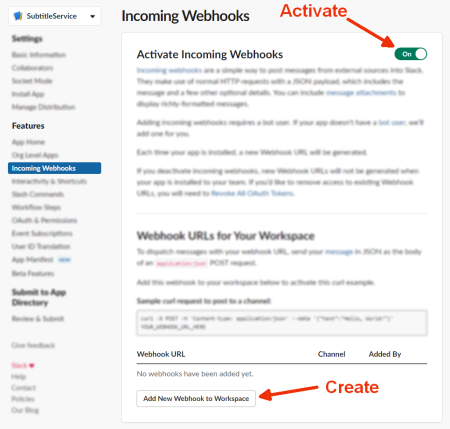
- Create An App
- Features > Incoming Webhooks
- Activate Incoming Webhooks
- Add New Webhook to Workspace
- Copy the url!
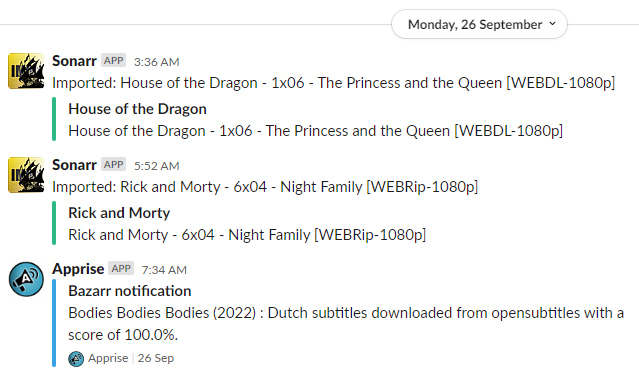
What can you expect:
Something like this:
For movies you often even get a poster picture etc!
Tip: Instead of a plain incoming webhook, you can wire the notifications through a proper Slack app/bot
(with a xoxb- bot token) for richer, better-looking messages like you get with the Discord integration.
Discord
- Setup your own Discord server
- Add your pirate text channel
- Open your server Settings
- Server Settings > Integrations
- Create Webhook
- Pick a cool icon etc
- Copy Webhook URL
- Save Changes
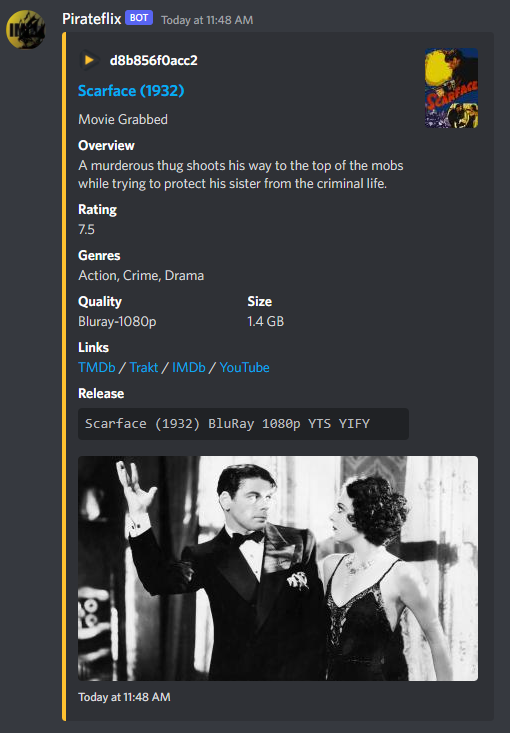
What can you expect:
A much better integration compared to Slack for sure!
Players
To connect with Jellyfin add an Emby connection.
For Plex there is a dedicated option available.
Notifiarr
 Notifiarr/notifiarr
:
Connect your *arr stack to Discord (and more) via Notifiarr.com
Notifiarr/notifiarr
:
Connect your *arr stack to Discord (and more) via Notifiarr.com
If you want a whole Dashboard…
- See it in action online
- Easy Step by Step installation instructions pdf
- Official Wiki
- Youtube: TRaSH Guides & Notifiarr