
The original setup picked
Jellyfin as the media server and the docker-compose post
folded the whole fleet into one compose.yml — except Jellyfin: it runs on
its own so it can reach the iGPU for hardware transcoding.
The compose
The official jellyfin/jellyfin image:
services:
  jellyfin:
    image: jellyfin/jellyfin
    container_name: jellyfin
    restart: unless-stopped
    network_mode: host
    devices:
      # Intel QuickSync render node — hardware transcoding
      - /dev/dri:/dev/dri
    volumes:
      # The data is a SQLite DB
      # Do not put this on Dropbox, NFS, SMB
      # As data corruption may occur!
      - /opt/jellyfin/config:/config
      - /opt/jellyfin/cache:/cache
      # :ro == read-only
      - /mnt/media:/data:ro
    environment:
      - TZ=Europe/Brussels
Hardware transcoding
The moment a client can’t handle the codec, container or bitrate (ex: a 4K HEVC file to a phone on mobile data), Jellyfin has to transcode, and doing that on the CPU will melt a core per stream. An Intel iGPU with QuickSync does it in hardware at a fraction of the power.
Two things make it work:
- Pass the GPU in.
devices: - /dev/dri:/dev/drihands the container Intel’s render node. That’s it for Docker on bare metal. (If your Jellyfin lives in an LXC/VM the iGPU has to be passed through there first — that’s a rabbit hole of its own; the container line stays the same.) - Turn it on in Jellyfin. Dashboard → Playback → Hardware acceleration → VAAPI (or Intel
QuickSync), device
/dev/dri/renderD128, tick H264/HEVC/VP9. Force a transcode from a client and the playback info overlay should read “Transcode (hw)”;intel_gpu_topon the host will show the video engine lighting up.
If your system has poor CPU/GPU, consider using Tdarr for automated transcoding
 HaveAGitGat/Tdarr
:
Distributed transcode automation using FFmpeg/HandBrake + Audio/Video library analytics + video health checking
HaveAGitGat/Tdarr
:
Distributed transcode automation using FFmpeg/HandBrake + Audio/Video library analytics + video health checking
The Companions
The ships that orbit Jellyfin.
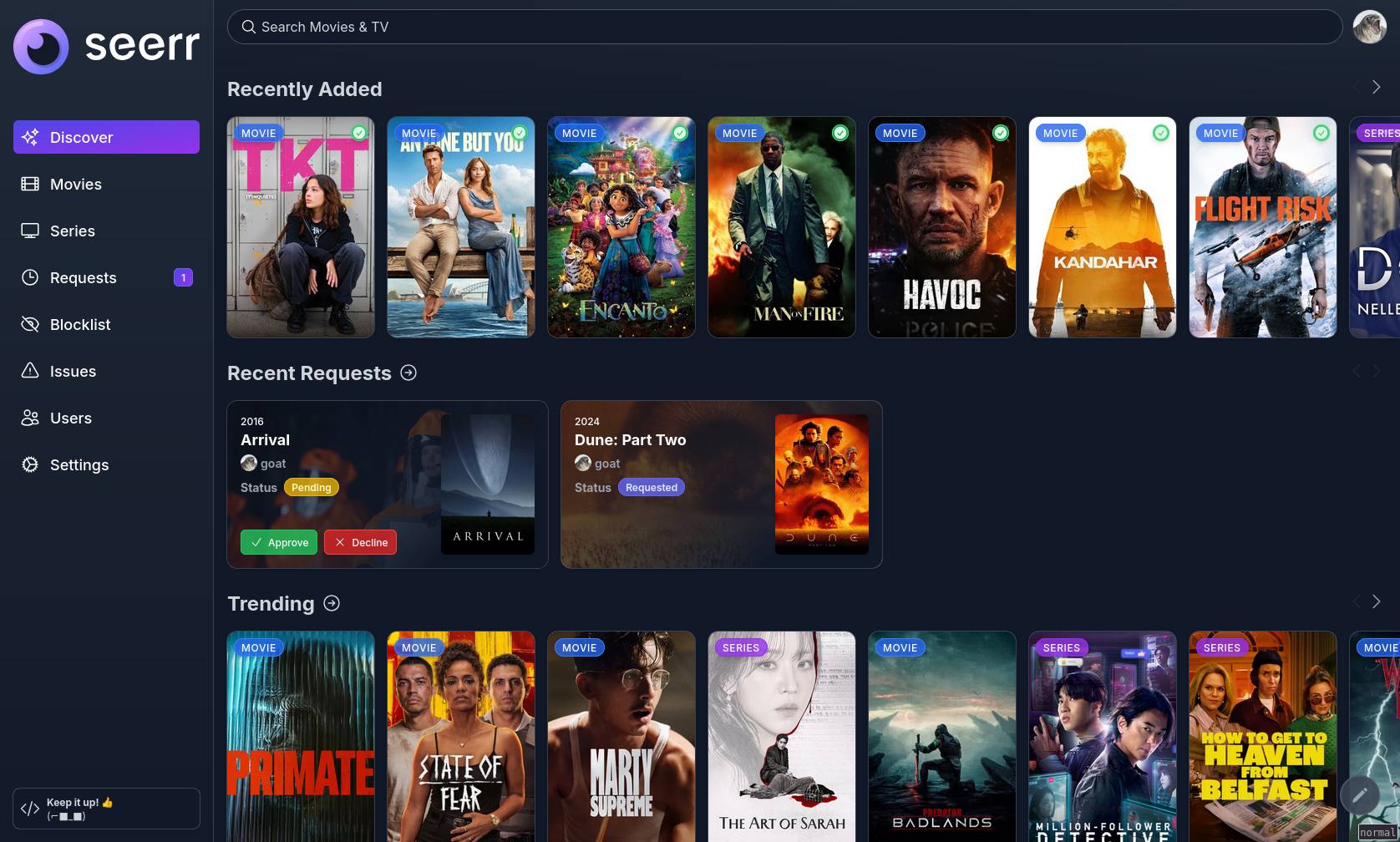
Seerr - requests

 seerr-team/seerr
:
Request app for friends and family
seerr-team/seerr
:
Request app for friends and family
The front door you give friends and family: they search, click request, and it lands in Sonarr/Radarr (directly or after you approve).
Also worth considering: adding SuggestArr for automated requests.
Docker Compose
seerr:
  image: ghcr.io/seerr-team/seerr
  container_name: seerr
  user: "${PUID}:${PGID}"
  init: true
  environment:
    - TZ=${TZ}
  volumes:
    - ${CONFIG_PATH}/seerr:/app/config
  ports:
    - ${SEERR_PORT}:5055
  restart: ${RESTART_POLICY}
Watch Analytics
There is the built-in Playback Reporting plugin for something lightweight and container-free. It’s very basic…
If you want more who watched what, when, and how much got transcoded stats, there is:
Jellystat

 CyferShepard/Jellystat
:
Statistics app for Jellyfin
CyferShepard/Jellystat
:
Statistics app for Jellyfin
Docker Compose
jellystat-db:
  image: postgres:16
  container_name: jellystat-db
  environment:
    - POSTGRES_USER=${JELLYSTAT_DB_USER}
    - POSTGRES_PASSWORD=${JELLYSTAT_DB_PASSWORD}
  volumes:
    - ${CONFIG_PATH}/jellystat-db:/var/lib/postgresql/data
  restart: ${RESTART_POLICY}

jellystat:
  image: cyfershepard/jellystat
  container_name: jellystat
  environment:
    - TZ=${TZ}
    - POSTGRES_USER=${JELLYSTAT_DB_USER}
    - POSTGRES_PASSWORD=${JELLYSTAT_DB_PASSWORD}
    - POSTGRES_IP=jellystat-db
    - POSTGRES_PORT=5432
    - JWT_SECRET=${JELLYSTAT_JWT_SECRET}
  volumes:
    - ${CONFIG_PATH}/jellystat/backup:/app/backend/backup-data
  ports:
    - ${JELLYSTAT_PORT}:3000
  depends_on:
    - jellystat-db
  restart: ${RESTART_POLICY}
Streamystats

 fredrikburmester/streamystats
:
Streamystats is a statistics service for Jellyfin, providing analytics and data visualization.
fredrikburmester/streamystats
:
Streamystats is a statistics service for Jellyfin, providing analytics and data visualization.
A newer stats alternative to Jellystat. I installed it for the heck of it… I’ll get back here with conclusions sometime 😉
Docker Compose
streamystats-db:
  image: tensorchord/vchord-postgres:pg17-v0.4.1
  container_name: streamystats-db
  environment:
    - POSTGRES_USER=${STREAMYSTATS_DB_USER}
    - POSTGRES_PASSWORD=${STREAMYSTATS_DB_PASSWORD}
    - POSTGRES_DB=streamystats
    - POSTGRES_HOST_AUTH_METHOD=scram-sha-256
    - POSTGRES_INITDB_ARGS=--auth-host=scram-sha-256
  volumes:
    - ${CONFIG_PATH}/streamystats-db:/var/lib/postgresql/data
  healthcheck:
    test: ["CMD-SHELL", "pg_isready -U ${STREAMYSTATS_DB_USER} -d streamystats"]
    interval: 10s
    timeout: 5s
    retries: 5
    start_period: 30s
  restart: ${RESTART_POLICY}

streamystats-job-server:
  image: ghcr.io/fredrikburmester/streamystats-job-server
  container_name: streamystats-job-server
  environment:
    - NODE_ENV=production
    - DATABASE_URL=postgresql://${STREAMYSTATS_DB_USER}:${STREAMYSTATS_DB_PASSWORD}@streamystats-db:5432/streamystats
    - PORT=3005
    - HOST=0.0.0.0
  depends_on:
    - streamystats-db
  restart: ${RESTART_POLICY}

streamystats:
  image: ghcr.io/fredrikburmester/streamystats-nextjs
  container_name: streamystats
  environment:
    - NODE_ENV=production
    - DATABASE_URL=postgresql://${STREAMYSTATS_DB_USER}:${STREAMYSTATS_DB_PASSWORD}@streamystats-db:5432/streamystats
    - JOB_SERVER_URL=http://streamystats-job-server:3005
    - HOSTNAME=0.0.0.0
    - SESSION_SECRET=${STREAMYSTATS_SESSION_SECRET}
    - NEXT_SERVER_ACTIONS_ENCRYPTION_KEY=${STREAMYSTATS_ENCRYPTION_KEY}
  depends_on:
    - streamystats-db
    - streamystats-job-server
  ports:
    - ${STREAMYSTATS_PORT}:3000
  restart: ${RESTART_POLICY}
Wizarr - invitations & onboarding
 wizarrrr/wizarr
:
Invite and onboard users to Jellyfin/Plex
wizarrrr/wizarr
:
Invite and onboard users to Jellyfin/Plex
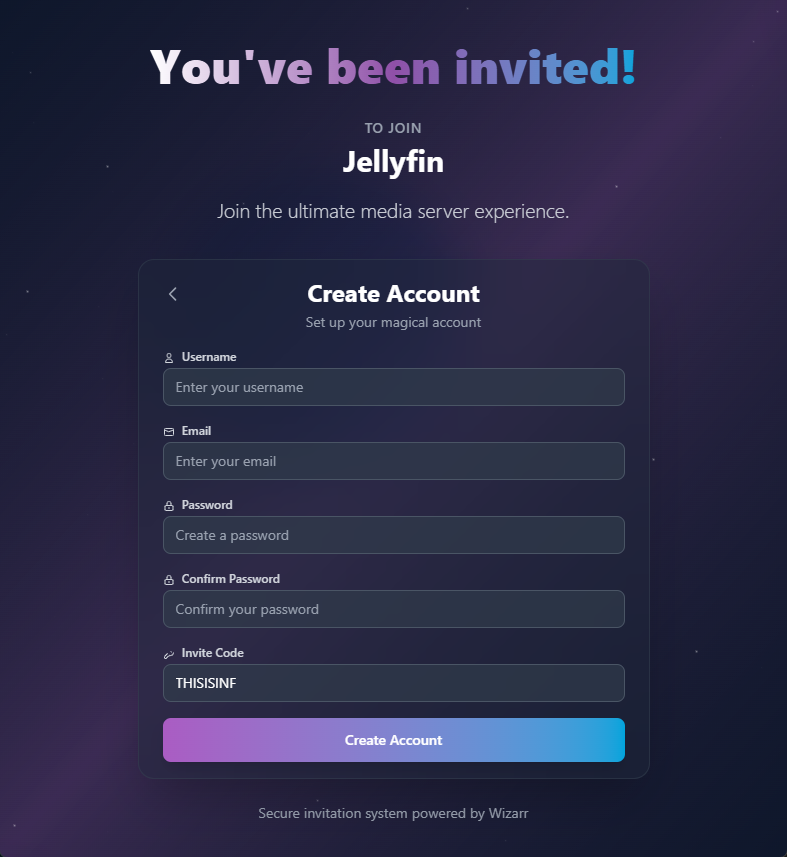
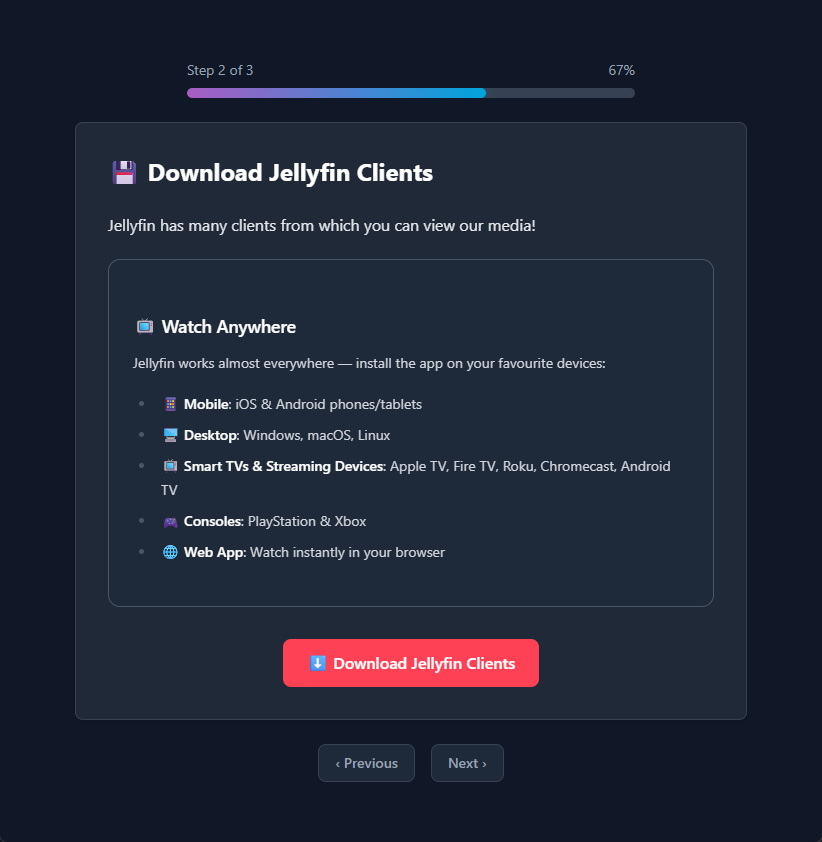
I thought this was a bit silly but then I tried it and well… It’s actually pretty nice, instead of giving your mom a URL, create her login/password and do a whole lot of explaining, you just give her a link and she gets onboarded with a wizard where she gets explained what it is, how to get going, fill in her own login/password.
Docker Compose
wizarr:
  image: ghcr.io/wizarrrr/wizarr
  container_name: wizarr
  environment:
    - PUID=${PUID}
    - PGID=${PGID}
    - TZ=${TZ}
    # Set to true ONLY if you are using another auth provider (Authelia, Authentik, etc)
    - DISABLE_BUILTIN_AUTH=false
  volumes:
    - ${CONFIG_PATH}/wizarr:/data
  ports:
    - ${WIZARR_PORT}:5690
  restart: ${RESTART_POLICY}
It works for Plex, Emby, Jellyfin and also for:
 advplyr/audiobookshelf
:
Self-hosted audiobook and podcast server
advplyr/audiobookshelf
:
Self-hosted audiobook and podcast server
 rommapp/romm
:
A beautiful, powerful, self-hosted rom manager and player.
rommapp/romm
:
A beautiful, powerful, self-hosted rom manager and player.
 gotson/komga
:
Media server for comics/mangas/BDs/magazines/eBooks
gotson/komga
:
Media server for comics/mangas/BDs/magazines/eBooks
 Kareadita/Kavita
:
Kavita is a fast, feature rich, cross platform reading server.
Kareadita/Kavita
:
Kavita is a fast, feature rich, cross platform reading server.
If you are using more than just Jellyfin, then this really is a no-brainer.
Afterwards you can even use it to easily reset their passwords, because obviously they are still going to forget it.
There is also an alternative inviter-app:
 hrfee/jfa-go
:
a bit-of-everything user management app for Jellyfin
hrfee/jfa-go
:
a bit-of-everything user management app for Jellyfin
Intro Skipper

 intro-skipper/intro-skipper
:
Automatically detect and skip intro/credit sequences in Jellyfin
intro-skipper/intro-skipper
:
Automatically detect and skip intro/credit sequences in Jellyfin
Adding a Skip Intro button!? My god… I need to install this right now… Update: I did, and it’s awesome 🤩
- Jellyfin → Dashboard → Plugins
- Prerequisite: Available → Install “TheTVDB”
- Manage Repositories → + New Repository
https://intro-skipper.org/manifest.json- I had to F5 for it to show up
- Intro Skipper → Install
- Dashboard → Restart
- Dashboard → Scheduled Tasks → Detect and Analyze Media Segments
- This is going to take a while if you already have some series
- Profit
Clients
 jarnedemeulemeester/findroid
:
Third-party native Jellyfin Android app
jarnedemeulemeester/findroid
:
Third-party native Jellyfin Android app
 jellyfin/swiftfin
:
Native Jellyfin Client for iOS and tvOS
jellyfin/swiftfin
:
Native Jellyfin Client for iOS and tvOS
 jmshrv/finamp
:
A Jellyfin music client for mobile
jmshrv/finamp
:
A Jellyfin music client for mobile
And our LG Smart TV installation guide.
Other Plugins
The ecosystem is deep. These two I have installed in Dashboard → Plugins → Catalog
- Trakt (scrobbling)
- OpenSubtitles downloader